Friday, July 27, 2007

Mobile Blogging: A Guide for Educators.

Thomas Cochrane

Unitec, Auckland

tcochrane@unitec.ac.nz

Abstract: This paper provides a short overview of the educational usefulness of blogging, followed by an overview of the key issues involved in mobile blogging, and an overview of various options available for mobile blogging today. The emphasis is on keeping it simple, so that the technology does not get in the way of the pedagogy.

Introduction

A junior at the university, Eric wakes up and peers at his PC to see how many instant messages (IMs) arrived while he slept. Several attempts to reach him are visible on the screen, along with various postings to the blog he's been following. After a quick trip to the shower, he pulls up an eclectic mix of news, weather, and sports on the home page he customized using Yahoo. He then logs on to his campus account. A reminder pops up indicating that there will be a sociology quiz today; another reminder lets him know that a lab report needs to be emailed to his chemistry professor by midnight. After a few quick IMs with friends he pulls up a wiki to review progress a teammate has made on a project they're doing for their computer science class. He downloads yesterday's chemistry lecture to his laptop; he'll review it while he sits with a group of students in the student union working on other projects. After classes are over he has to go to the library because he can't find an online resource he needs for a project. He rarely goes to the library to check out books; usually he uses Google or Wikipedia. Late that night as he's working on his term paper, he switches back and forth between the paper and the Internet-based multiplayer game he's trying to win .

The above snapshot of today’s learners gives us an idea of their characteristics:

  • Technically literate

  • Multitasking

  • Collaborative

  • Connected

To engage these learners we need to thoughtfully integrate their preferred means of communicating into the teaching and learning environment.

Pedagogy and today’s learners

Technologies (hardware and software) should be chosen according to their fit with the underlying pedagogies guiding the course delivery.


Teaching and learning innovations are best implemented when informed by learning theory. A pedagogical framework for implementing social software tools via wireless mobile devices can be developed by drawing on concepts from: constructivism , social constructivism , communities of practice , a conversational model of learning , and the social construction of technology .


Thus a mobile (m-learning) pedagogical model will focus upon enhancing communication, collaboration, and will be student-centred.


Constructivism

Constructivism is based on the work of Piaget , Dewey and Bruner . According to these theorists, knowledge is constructed from our own experiences, and enabled by teachers. The learner learns best by being involved in the learning process, discovering new concepts.

A student who achieves a certain knowledge through free investigation and spontaneous effort will later be able retain it; he will have acquired a methodology that can serve him for the rest of his life .

The role of the teacher varies in the thinking of these founders. For Piaget the teachers role was mainly to provide a stimulating environment for learning, while for Bruner the teacher plays a much more significant role in directing the student in their construction of knowledge. Constructivism is a synthesis of these various ideas.

The main constructivist proposition is that the child constructs his own version of reality from his own unique experiences. It is this construction he then uses to deal with any new experience in that field. The process of constructing his own knowledge is an active one. He does so by forming new relationships between ideas he already has. To these he incorporates new pieces of information... the most important thing for teachers to know is what each pupil knows. The teacher can then plan a learning programme for each pupil, taking his initial knowledge and learning strategies as the starting-point .

Social Constructivism

Some of the seminal thinking behind Social Constructivism is attributed to Vygotsky, according to whom the social context is very important in constructing knowledge. Vygotsky argued that learning is a collaborative process.

Every function in the child's cultural development appears twice: first, on the social level, and later, on the individual level; first, between people (interpsychological) and then inside the child (intrapsychological). This applies equally to voluntary attention, to logical memory, and to the formation of concepts. All the higher functions originate as actual relationships between individuals .

According to Vygotsky the role of the teacher is to create and maintain the Zones of Proximal Development – an environment that will help move the learner from their current understanding to a potential deeper level. Bandura is one of the theorists who have expanded upon Vygotsky’s ideas.

Instructional models based on the social constructivist perspective stress the need for collaboration among learners and with practitioners in the society … Social constructivist approaches can include reciprocal teaching, peer collaboration, cognitive apprenticeships, problem-based instruction, webquests, anchored instruction and other methods that involve learning with others .

Social constructivism forms the underlying basis for learning theories such as ‘Communities of Practice’ and the ‘Social Construction of Technology’.


Web2

'Social Software' (interactive collaborative software) is one of the key features of what has been termed 'Web2' . Examples of current and emerging social software tools include blogs, wikis, RSS, instant messaging, podcasting, social book marking, etc… . The key characteristics of social software fit well with the pedagogies described above, enabling a natural and relatively simple approach to creating collaborative learning communities.


Web2 is about:

* Moving beyond CONTENT

* Ease of use

* Interactivity

* Collaboration & sharing

* Customisation

* Personal Publishing


To illustrate the end-user emphasis of web2, Time magazine named ‘You’ as person of the year for 2006 . The educational implications of web2 social software is the source of recent interest .


Wireless Mobile Devices coupled with open-source Social Software tools potentially provide the basis for enhancing teaching and learning in virtually any discipline, providing an environment that stimulates reflection, critique, collaboration, and user generated content – i.e. a social constructivist environment.


An article in the latest New Zealand TUANZ Topics magazine asks: "Are web2 communication tools such as blogs, wikis, webcasts and podcasts now an essential part of the teacher's toolkit?" (The article is written from a secondary school perspective). They conclude:

You and I are the last generation that has the prerogative of deciding whether or not we're going to embrace technology. But the kids we are teaching now, the ones that are under my watch in the classroom, they aren't given that same prerogative. If they don't master these skills, I'm actually dooming them to a lower level of opportunity...

The thing we need to understand about the type of learners coming to us today is that not only do they have different tools, but they actually process differently.

Most kids are walking around with one or two cellphones in their pocket, using them to text their friends, surf the Web, take photos, and post to their blogs. And yet as soon as they get to school they're told to turn the cellphones off.

If we'd just let students work to their strengths, instead of their weaknesses, we'll start to celebrate what they can do, and what they come to the classroom with - and that is a propensity toward technology .

Blogs

A Blog is a reverse chronological online journal, the newest postings appear at the top of the blog while older postings are archived. Only the owner of the blog, and those given group membership by the owner can make blog postings. However, visitors can add comments to blog postings, and automatically check for new postings via an RSS/Atom newsreader. A blog is a much more personal space than a typical LMS asynchronous discussion forum. Blog hosting software usually provides customisable templates, and add-on widgets for embedding multimedia files. Additionally a blog is usually accessible via the Internet without requiring institutional passwords, and remains the property of the student/owner after the completion of their course. Bloggers therefore have a potential worldwide audience and can form international networks with like-minded people. Some employers are googling potential employees to check their suitability. These aspects add incentive to students to develop and maintain a quality blog.


There are a variety of free online blog hosts, the most popular being http://www.blogger.com. Others include:


Blog posts can be made via a web browser, a dedicated blogging application, via email, SMS, or via plug in extensions to web browsers like Firefox or Flock, or even MS Word. Readers interested in regularly following a blog can subscribe to it via its RSS feed.


There has been a lot of interest in the educational applications of blogs . In an educational context, blogging can be utilised as an online reflective journal. The use of reflective journals in education is well established . You can use similar strategies for assessing and moderating blogs to those used for the familiar online discussion forums utilised in most LMS’s. An assessment rubric may cover: expected number and regularity of blog posts, quality of reflections, references to external sources, number of comments, use of multimedia, alignment with the course or project content/context etc… Student Blogs linked via RSS feeds and using a Tutor blog to notify students of important details using RSS can form the basis for a rich online collaborative community . Blogging enhances the following skills :

  • Sharing — thoughts, concepts, experiences, knowledge

  • Analyzing

  • Reflecting — Critiquing, Writing, Questioning, Reacting

  • Reading

  • Communication

  • Record keeping — thoughts, concepts, and experiences

  • Collaboration — with peers, people (experts, students) around the world


Variations on blogging include image and video blogging. Currently two of the most popular examples are http://www.flickr.com (image blogging) and http://www.youtube.com (video blogging). Emerging Mobile multimedia blogging sites include: http://www.splashblog.com and http://www.mojungle.com.

RSS

Rich Site Summary, or Real Simple Syndication, RSS provides a way of subscribing to content via news reading software (e.g. http://www.newsgator.com/). RSS can be used as an enabling/delivery mechanism common to most social software tools . RSS is a real time saver. Instead of logging onto all of your favourite websites one at a time, use a newsreader application to automatically download the headings of new posts, and then you can choose to visit the site for more information or not.


RSS is a great companion to Blogs - you can subscribe to your entire classes blogs in one simple window and keep track of your students’ progress.


Most news type websites now have RSS feeds. There will be an orange 'XML' or 'RSS' or 'FEED' symbol on the site, click this to find the sites RSS feed address and put it into your preferred RSS newsreading software.


There are two main types of feeds:


1. RSS

2. ATOM


Blogger.com uses atom feeds, e.g. my Blog feed is: http://tcblogtest.blogspot.com/atom.xml


Online News Aggregators

You can subscribe and read RSS feeds online using several free online news aggregator systems:


Newsgator (http://www.newsgator.com) allows you to subscribe to your favourite RSS feeds and read them on any Internet connected computer with a web browser. It also supports synchronization with dedicated RSS newsreading software on Mac (NetNewsWire) and PC (FeedDemon), and the ability to synchronize subscriptions between multiple registered computers with one Newsgator account.


Bloglines (http://www.bloglines.com) is very similar to Newsgator, but also has free support for mobile devices. This is a pay - 'premium' option with Newsgator.


Google Reader (http://www.google.com/reader) is the challenger to the online RSS reading throne. Google Reader is part of a suite of free online Google tools that provide simple mobile interfaces (including GMail, Google Calendars, Search, Maps, Picasaweb etc…) making it a good option.


Mobile Blogging

Why mobile?

The convergence of ubiquitous broadband, portable devices, and tiny computers has changed our concept of what a phone is meant to be. A pocket-sized connection to the digital world, the mobile phone keeps us in touch with our families, friends, and colleagues by more than just voice. Our phones are address books, file storage devices, cameras, video recorders, wayfinders, and hand-held portals to the Internet—and they don’t stop there. The ubiquity of mobile phones, combined with their many capabilities, makes them an ideal platform for educational content and activities. We are only just beginning to take advantage of the possibilities they will offer.

Today’s mobile phones are powerful computers. The catch phrase of Nokia’s current add campaign for its N-Series smart-phones is: “It’s what computers have become” . Mobile phone ownership in New Zealand has almost reached 100 per cent (81.1% 2004 ). Its rise to ubiquity is described as a

…stealthy but rapid shift from a telephony device towards a portable, personal media hub that enables an increasing range of personalised and customised communication, entertainment, relationship management and service functions. Its reach is pervasively global and trans-cultural, possibly more so than any other media form including the internet and world wide web .

The largest growth area regarding Internet usage is mobile access. “‘Mobile, mobile, mobile,’ were the words of Google chief executive Eric Schmidt this week when asked what technologies are most intriguing to the computer web search leader” . Marc Prensky remarks: “What can you learn from a cell phone? Almost anything!” .

Overview

Mobile devices are inherently social, enabling rich social interaction, and the potential for enhancing group work and communication within educational settings. Today’s learners are constantly connected to their social networks via their wireless mobile devices. Their preferred method of communication is text messaging (65% ), followed by instant messaging .


Fig 1. The most effective form of emerging media to reach New Zealanders aged 14 to 30.


Mobile devices coupled with wireless networks have been described as ‘disruptive technologies’, and so have the web2 social software tools that have developed (blogs, wikis, podcasting, vodcasting, online photo blogging etc…) . Their disruptive nature forces a rethink of pedagogical strategies and relationships in education.


Blog options for mobile include: SMS, MMS, email, mobile formatted web interfaces, Java clients, and specific OS application clients for smart-phones (Windows Mobile, Palm OS, Symbian, Linux). Most mobile blogging options initially require the blog host to be set-up using a PC before being accessed via the mobile, although there are some exceptions.

Key Issues

Technical support and mobile configuration

Mobile carriers are attempting to make Internet configuration of mobiles relatively simple. In New Zealand, all Telecom mobiles come pre-configured for the internet, while Vodafone provide an SMS auto configuration service . Parallel imported phones can usually be set-up from SMS auto configuration forms found on the manufacturers local website.

As every different mobile manufacturers web browser is different, to keep the user experience as similar as possible, use the Opera mini web browser, which can be downloaded to almost any internet and Java capable mobile phone by typing the URL http://operamini.com into the phones built-in WAP or web browser.


Fast mobile data access is not required for blog posting and RSS reading, as these are basically text based. However, 3G data access is required for multimedia blogging (picture, audio or video uploading). 3G coverage maps are available from both Telecom and Vodafone .


Data costs

For mobile email and Internet access a data account is required. For basic mobile blogging and RSS reading a low data plan (10-20MB/month) will probably suffice. For multimedia blogging a ‘broadband’ mobile data plan will be required. If you do not have a data plan, you will be charged at the 'casual data' rate:


  • Vodafone NZ = 1c per Kb = $10000/GB

  • Telecom NZ = 5c per Kb = $50000/GB


Table 1. Vodafone Mobile Data Plans .

Plan

Monthly access fee

Included data

Additional Cost per MB

Type of Usage

Casual

$0

0 MB

$10.00

Less than 200 emails

Mobilise Data 3MB

$10.00

3 MB

#2.00

600 emails

Mobilise Data 15MB

$19.00

15 MB

$1.50

3,000 emails

Broadband Starter

$39.95

200 MB

$0.50

Heavy data usage

Broadband Everyday

$59.95

1 GB

$0.50

Very heavy data usage


Table 2. Telecom Mobile Data Plans .

Plan

Monthly Access Fee

Included data

Additional Cost per MB

Type of Usage

Casual

$0

0 MB

$8.00

Occasional use

Flexi

$10.00

0 MB

$1.00

Very low use

Mobile Broadband 20

$22.22

20 MB

$1.00

Smartphones only

Mobile Broadband 50

$35.00

50 MB

$0.95

Medium PDA/Smartphone users

Mobile Broadband 100

$52.44

100 MB

$0.71

Low – Medium Use

Mobile Broadband 200

$65

200 MB

$0.60

Medium use

Mobile Broadband 200+

$39.95

200 MB

$0.50

Medium - high use

Mobile Broadband 400

$99.00

400 MB

$0.50

High Use

Mobile Broadband 1GB+

$59.95

1 GB

$0.50

Heavy Use


Variety of handsets

There are at least nineteen mobile manufacturers supplying cell phones to the New Zealand market. However, as there are only two mobile carriers who promote a small set of handsets during various specials, the actual variety is relatively small compared to the worldwide market. Thirteen handsets, from five manufacturers currently hold seventy one percent of the New Zealand market. Mobile users update their mobile phone on average every eighteen months. However, teenagers tend to update much more often, and generally have two mobiles to catch both of the Telecom and Vodafone specials.


Table 3. Manufacturer market share in Oceania – New Zealand, March 2007 .

Manufacturer

Market Share

Motorola

33.97%

Nokia

23.6%

Sharp

21.69%

Sony-Ericsson

9.31%

Samsung

2.2%


Integration into teaching and learning

One of the biggest challenges is the changing role of the teacher. This includes the need to become techno-savvy in order to model the educational use of the technology, particularly if the teacher is also the technology steward for the class/community. Support structures can be developed utilizing the concept of communities of practice. A community of practice can be based around the course/class – incorporating the teacher, technical support (if outside), and students. A community of practice that provides teacher support can also be created from like-minded teachers. The members need not be limited to your local institution – use the tools: create a support blog, subscribe to relevant blogs, use instant messaging to communicate with peers worldwide etc…


Small screen size

The small screen size of mobiles makes them an inherently personal device. In a classroom setting, demonstrating the set-up and use of mobile blogging requires some creative pre-planning. This may mean either using remote screen controlling software on a PC connected to a video projector, or creating slides/movies using screen-grabbing software on the mobile and transferring the screenshots to a PC via USB, or bluetooth. Another alternative is to use the SDK java application development kits that most manufacturers provide for free, but then you are limited to demoing Java applications only. Videos taken directly of mobile use tend to be of poor quality for viewing detail, but give an idea of their usage. Bluetooth mobiles can stream pictures and audio via bluetooth multimedia convertors, but do not mirror the mobiles on screen displays. Finally, the latest Nokia handsets (N95 and N93) supply direct video out ports for large screen viewing – at the expense of battery usage.


SMS Blogging

The simplest mobile blogging solution is to use text messaging to post to your blog. The main limitation is the 160-character limit of text messages, so your SMS blog posts will always be short. Most mobile carriers provide an SMS blog service for their customers, however their blog software is usually not as configurable as the more popular mainstream blog hosts. To SMS post to these ‘mainstream’ blog hosts requires an intermediary service. One such free service is http://letmeparty.com. This is simple to set-up, and works with the most popular blog hosts. First use a PC with Firefox (letmeparty.com does not support Internet Explorer Jscript) to create a free registration at letmeparty.com, register your mobile phone number (in international format: i.e. +6421xxxxxx for Vodafone NZ), enter your blog host type, address, username and password. Finally send your SMS to +13128047068 and letmeparty.com forwards your SMS to your blog as a post.


Email and MMS blogging

Older blog hosts supported mobile blogging via email and MMS, although almost all blog hosts offer this as a mobile blogging option. This requires the set-up of your blog host on a PC, followed by obtaining your secret email address to access your blog (found in your blog settings). Your mobile must be configured for sending email via your mobile carrier. Then you can put your blog email address into your mobile address book, and simply send an email to this address to blog. The email subject becomes the post title, while the main text of the email becomes the text of your blog post. Attaching pictures, audio, or video to your blog email address will usually allow uploading of this content to your blog host.

Web2 Mobile Blogging

A revolution has been underway with the convergence between web2 social software and mobile devices. These mobile web2 services enable constructivist collaborative environments with very little technical overhead required by the lecturer or students.


The recent release of the Opera mobile and mini web browser for almost every mobile phone and PDA has opened the door for viewing many standard web sites and web2 services on mobile devices without any translation. However, the best mobile experience comes from blog hosts that have dedicated mobile friendly versions for viewing and posting, e.g.


Fig 2. Mobile Wordpress interface.


Fig 3. Mobile Flickr Interface.


The Opera mini web browser also supports most camera phones for picture blogging directly to http://my.opera.com, and includes a built-in RSS reader for a limited number of on device subscriptions. There is an online demo of the Opera mini web browser at http://www.operamini.com/demo.


Web2 Mobile RSS

Most online newsreading sites now have mobile access, though not all provide this facility for free. Good examples are:


Fig 4. Mobile Google Reader Login.


Fig 5. Mobile Google Reader Interface.


Java Clients

Java clients are small applications that can be downloaded via a PC and installed onto your mobile (via USB or bluetooth), or installed directly onto your mobile ‘over the air’ (OTA) by putting a download URL into your mobile’s built-in web or WAP browser. The Java application lives on your mobile, and requires configuring with the address, username and password for your blog and RSS host. The mobile device must be configured with appropriate Internet access settings for your mobile carrier, and a data account is recommended. These Java clients do not require specific mobile versions of blog hosts, but provide a simple mobile interface to most standard blog hosts. While most modern mobiles support Java applications, there are differences between manufacturers and even models that make wide compatibility difficult.


Example Java Blogging clients

  • Kablog

  • Blogplanet

  • Opera mini


Example Java RSS clients


For more information visit the author’s wiki page on mobile learning .

Conclusions

The educational benefits of social software, in particular blogging, have been discussed. The alignment with social constructivist pedagogy and new learner preferences provides the potential for the development of collaborative learning communities, enhancing student-student and student-tutor communication and interaction. Mobile blogging coupled with social software tools potentially provide the basis for enhancing teaching and learning in virtually any discipline, providing an environment that stimulates reflection, critique, collaboration, and user generated content (i.e. a social constructivist environment). Issues and options around mobile blogging have been discussed, providing a starting guide for educators who want to engage with mobile blogging.


References

Alexander, B. (2004, September/October). Going nomadic: Mobile learning in higher education. Educause Review, 39, 28-35.


Alexander, B. (2006, March/April). Web 2.0: A new wave of innovation for teaching and learning? Educause Review, 41, 33-44.


Alexander, B., Brown, M., Doogan, V., Johnson, L., Levine, A., Sabean, R., et al. (2006). The horizon report 2006 edition: A collaboration between The New Media Consortium and the Educause Learning Initiative.


Anderson, P. (2007). What is web 2.0? Ideas, technologies and implications for education. Retrieved March, 2007, from http://www.jisc.ac.uk/whatwedo/services/services_techwatch/techwatch/techwatch_ic_reports2005_published.aspx


Bain, J. D., Ballantyne, R., Packer, J., & Mills, C. (1999). Using journal writing to enhance student teacher's reflectivity during field experience placements. Teachers and Teaching, 5(1), 51-73.


Bandura, A. (1986). Social foundations of thought and action. Englewood Cliffs, NJ: Prentice-Hall.


Becta. (2006). Emerging technologies for learning. Retrieved 6 April, 2006, from http://www.becta.org.uk/corporate/publications/


Becta. (2007). Emerging technologies for learning: Volume 2 (2007). Retrieved March, 2007, from http://partners.becta.org.uk/index.php?section=rh&catcode=_re_rp_ap_03&rid=11380


Bijker, W. (1995). Of bicycles, bakelites, and bulbs. Toward a theory of sociotechnical change. Cambridge: MIT Press.


Bruner, J. (1966). Toward a theory of instruction. Cambridge: Belknap Press of Harvard University.


Bryant, T. (2006). Social software in academia. Educause Quarterly, 2, 61-64.


Cameron, D. (2006, 4-7 December). The rocket in your pocket: How mobile phones became the media by stealth. Paper presented at the 2nd joint JEANZ/JEA conference, Rendevous Hotel, Auckland, New Zealand.


Cochrane, T. (2006). Mlearning overview. from http://ltxserver.unitec.ac.nz/mediawiki/index.php/MlearningOverview


Educause. (2005). Videoblogging. 7 Things You Should Know About., 2005, from http://www.educause.edu/LibraryDetailPage/666?ID=ELI7005


Educause Learning Initiative. (2005). Blogs. 7 Things You Should Know About., 2005, from http://www.educause.edu/LibraryDetailPage/666?ID=ELI7006
http://www.educause.edu/ELIResources/10220

Farmer, J. (2004, 5-8 December). Communication dynamics: Discussion boards, weblogs and the development of communities of inquiry in online learning environments. Paper presented at the 21st ASCILITE Conference: Beyond the comfort zone, Perth.


Farmer, J., & Bartlett-Bragg, A. (2005, December 4 - 7). Blogs @ anywhere: High fidelity online communication. Paper presented at the 22nd ASCILITE Conference: Balance, Fidelity, Mobility. Maintaining the Momentum? Brisbane.


Fielder, S. (2004, June 24). Introducing disruptive technologies for learning: Personal webpublishing and weblogs. from http://static.cognitivearchitects.com/gems/Seblogging/EdMediaSymposium.pdf


Glogoff, S. (2005). Instructional blogging: Promoting interactivity, student-centered learning, and peer input. Innovate, 1(5), http://www.innovateonline.info/index.php?view=article&id=126.


Grossman, L. (2006). Time's person of the year: You. Time, December 13.


Head, G., & Dakers, J. (2005). Verillon's trio and wenger's community: Learning in technology education. International Journal of Technology and Design Education, 15, 33-46.


Kaplan-Leiserson, E. (2004). Rss: A learning trend. Retrieved 4 April, 2005, from http://www.learningcircuits.org/2004/may2004/0405_Trends.htm


Kim, B. (2001). Social constructivism. In M. Orey (Ed.), Learning, teaching, & technology. http://www.coe.uga.edu/epltt/SocialConstructivism.htm: The University of Georgia College of Education.


Lamb, B. (2004). Thewayitwasmeanttobe. Educause review, September/October 2004, 36-48.


Laurillard, D. (2001). Rethinking university teaching: A framework for the effective use of educational technology (Second ed.). London: Routledge.


Luca, J., & McLoughlin, C. (2005, December 4 - 7). Can blogs promote fair and equitable teamwork? Paper presented at the 22nd ASCILITE Conference: Balance, Fidelity, Mobility. Maintaining the Momentum? Brisbane.


Mobref. (2007). Manufacturer market share in oceania - new zealand (march 2007). Retrieved 23 April, 2007, from http://www.mobref.com/statistics/OC-NZ/manufacturer/All


New Media Consortium. (2007). The horizon report: 2007 edition. The Horizon Report, 2007, from http://www.nmc.org/horizon/2007/report


New Zealand Herald. (2006). The most effective form of emerging media to reach new zealanders aged 14 to 30. Auckland: New Zealand Herald.


Nokia. (2007). Nokia nseries. Retrieved 26 April, 2007, from http://www.nseries.com/index.html


O'Reilly, T. (2005). What is web 2.0: Design patterns and business models for the next generation of software. Retrieved March, 2006, from http://www.oreillynet.com/pub/a/oreilly/tim/news/2005/09/30/what-is-web-20.html


Oblinger, D., & Oblinger, J. (2005). Is it age or it? First steps towards understanding the net generation. In D. Oblinger & J. Oblinger (Eds.), Educating the net generation (pp. 10-29): Educause.


Opera Software. (2006). Opera mini. Retrieved June, 2006, from http://www.opera.com/products/mobile/operamini/campaign/


Panday, P. P. (2007). Why blogs? Retrieved April, 2007, from http://www.educause.edu/LibraryDetailPage/666?ID=CSD4902


Piaget, J. (1973). To understand is to invent. New York: Viking Press.


Prensky, M. (2005). What can you learn from a cell phone? Almost anything! Innovate, 1(5), http://www.innovateonline.info/index.php?view=article&id=83.


Putt, S. (2007, March/April). Get with the program. TUANZ Topics, 17, 35-38.


Sutherland, P. (1992). Cognitive development today. Piaget and his critics. London: Paul Chapman Publishing Ltd.


Telecom New Zealand. (2007a). Mobile broadband data plans. Retrieved 26 April, 2007, from http://www.telecom.co.nz/content/0,8748,202032-201933,00.html


Telecom New Zealand. (2007b). Mobile internet. Retrieved 26 April, 2007, from http://www.xtra.co.nz/mobile/0,10311,00.html


Telecom New Zealand. (2007c). Our mobile coverage: Telecom new zealand. Retrieved 26 April, 2007, from http://www.telecom.co.nz/coverage


Trafford, P. (2005). Mobile blogs, personal reflections and learning environments. Ariadne(44), 9.


Vodafone NZ. (2005). New zealand 3g coverage. Retrieved 26 April, 2007, from http://www.vodafone.co.nz/coverage/3g/cities/Auckland/maps.jsp?image_id=1_1&item=3g


Vodafone NZ. (2007a). Data plans for your mobile. Retrieved 26 April, 2007, from http://www.vodafone.co.nz/pricing_plans/mobile_data.jsp?item=mobile_data


Vodafone NZ. (2007b). Mobile data. Retrieved 26 April, 2007, from http://www.vodafone.co.nz/business/10.2.1.7_mobile_data.jsp


Vodafone NZ. (2007c). Vodafone internet access (gprs) configuration. Retrieved March, 2007, from http://wireless.vodafone.co.nz/m2minternet/


Vygotsky, L. (1978). Mind in society. Cambridge, MA: Harvard University Press.


Wakabayashi, D., & Auchard, E. (2007). Mobile phones: Google's next frontier. New Zealand PC World, 23 April.


Wenger, E. (2005, 14 October). Communities of practice: A brief introduction. Retrieved 17 July, 2006, from http://www.ewenger.com/theory/index.htm


Wenger, E., White, N., Smith, J., & Rowe, K. (2005). Technology for communities. Retrieved 14 July, 2006, from http://technologyforcommunities.com/


Wednesday, July 25, 2007

Young people don’t see “tech”

Interesting - we already knew this, but here's confirmation:


Young people don’t see “tech”: "A Reuters report today puts us past the time when kids are attracted to technology for its own sake. In fact, few of them say they do when asked if they like technology:

Only a handful think of technology as a concept, and just 16 percent use terms like ‘social networking,’ said two combined surveys covering 8- to 24-year-olds published on Tuesday by Microsoft and Viacom units MTV Networks and Nickelodeon.

‘Young people don’t see ‘tech’ as a separate entity - it’s an organic part of their lives,’ said Andrew Davidson, vice president of MTV’s VBS International Insight unit.

‘Talking to them about the role of technology in their lifestyle would be like talking to kids in the 1980s about the role the park swing or the telephone played in their social lives — it’s invisible.’

The surveys involved 18,000 young people in 16 countries including the UK, U.S., China, Japan, Canada and Mexico."


(Via Smart Mobs.)

Free NewsGator Mobile for Mobiles

Newsgator have finally seen the light - spurred on by the release of the iPhone, and produced a mobile web2 interface for their online RSS reading/synchronizing system!I wonder how it will stack up against Google Reader?

Free NewsGator Mobile for iPhone: "NewsGator Daily: ‘This morning we announced the release of NewsGator Mobile for iPhone, a free newsreader that takes advantage of the unique design and user interface of Apple’s wildly popular new device. The free service, which works with iPhones and other mobile devices is accessible at http://m.newsgator.com.’"

(Via Ranchero.)


NewsGator Unveils Free Mobile Reader for iPhone: "‘The beauty of NewsGator's new mobile-optimized, Web-based feed reader isn't just that it works well with an iPhone – it's that it syncs my subscription list, including which messages I've already read, with NetNewsWire on my Mac,’ said John Gruber of Daring Fireball, a top Apple-focused blog."


(Via NewsGator News and Updates.)

Tuesday, July 24, 2007

Skype on Mobile Phone

If you have a Skype account, you can add credit to your account to purchase SkypeOut time to use your mobile phone (with 3G data plan or WiFi) to make Skype calls using IM+ for Skype. Very nice!

SeeHandango for trial download.

More info.

Skype wirelessly anywhere in a cost-effective way

IM+ for Skype is a mobile application that enables voice and text communication with other Skype users and provides cost-effective calling to landlines and mobiles.

Supported Platfoms:

* BlackBerry handhelds

* Symbian S60 v3 phones

* Palm OS

* Java powered phones

* Windows Mobile Pocket PC beta version will be available at the end of July

* iPhone - Coming soon

Saturday, July 21, 2007

Nokia Mac Support

Nokia are making life easier for Mac Users!

Support & plugins for iSync

USB data setup

Setting up iSync


Nokia Media Transfer software for Mac


Also third party freeware for taking Nokia screen grabs - great for tutorials!
ScreenSnapS60

Thursday, July 19, 2007

Vodafone launches 3GB Mobile Broadband

Vodafone launches 3GB Mobile Broadband

From GSM Mobile NZ:

Vodafone is pleased to announce the launch of the Broadband Pro mobile broadband plan. Designed to complement the existing mobile broadband range, Broadband Pro offers users 3GB of data per month for $69.95 with a 24 month contract.

“We already have an entry level 200MB/month plan and the very popular 1GB plan, but customers have told us they want more data when they’re on the move,” says GM of Products and Services, Kursten Shalfoon.

The new plan is also available at $79.95 per month (with an additional $10 for bundle insurance) for customers who want no fixed term.

“The customer automatically gets the benefit of our bundle insurance which gives them a buffer of an additional 3GB of traffic to ensure they don’t run the risk of exceeding the monthly limit.”

Customers who sign up for 24 months can choose between a free Vodem or a Vodafone Mobile Connect PC card for $99. The Vodem has been wildly successful in the New Zealand market and requires no additional software to install – customers simply plug in the Vodem into a USB port on their laptop or desktop and the Vodem takes care of installation.

Vodafone’s 3G Broadband network offers real-world speeds of between 800kbit/s and 1.4Mbit/s download speed and 380kbit/s upload speed. The Broadband Pro plan is available from Monday, July 21.

Vodafone’s 3G broadband network offers peak speeds of up to 3.2Mbit/s and average speeds of between 800kbit/s and 1.4Mbit/s.

more info see www.vodafone.co.nz

VIA NanoBook UMPC

http://www.ultramobilelife.com/index.php?option=com_content&task=view&id=385

006.jpg.jpg

  • 1.2GHz,
  • 7" 800x480,
  • 30GBHD,
  • 850g,
  • Windows,
  • $600US

Great example of Student Web2 use!

Here's a great example of a student's own initiative in using web2 to document their learning at Unitec (Boat Building course):

Blog:

http://kiaoratearoa.blogspot.com/

Photoblogging using 'Comic Life' for annotations:


BoatBuildingPage_17.jpg


YouTube videos of process:

http://www.youtube.com/watch?v=EgVQSdfbLV0

Friday, July 06, 2007

EIT 'Virtual Workshop'

While I'm still fighting off a nasty cold, stuck in Auckland instead of presenting at the inaugural EIT "Teaching & Learning Symposium", participants in my 'Virtual Workshop' on Mobile Blogging at EIT Napier sent me an MMS photo of themselves! Very cool to get some 'virtual feedback'!!!

Workshop Wiki Notes.

EITvirtualWorkshop.jpg

Tuesday, June 26, 2007

Podcast Workshop

The Podcast three-day workshop series is generating fun & engagement from the participants. Have a listen to some of the participants 'Podcast Shows' from the links below - they will be updated each week, next week we are creating 'enhanced podcasts'!!!


NOTE: you can 'subscribe' to podcasts shows using iTunes!

Sunday, June 24, 2007

Fauxto

http://www.fauxto.com/ is an impressive free online photo editor that has many of the features of Photoshop!

Friday, June 22, 2007

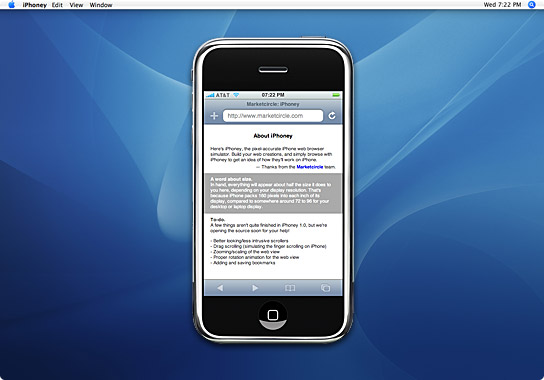
iPhoney - iPhone web previewer

iPhoney is a small app that allows you to preview what websites will look like on the iPhone screen - its not an iPhone simulator though - it uses a skinned version of Safari:
  • Test your iPhone-enabled Web 2.0 applications and compatible web sites.

  • Open any website that works with Safari (use Safari 3 beta for the most accurate experience).

  • Rotate to see websites in either portrait or landscape orientation.

  • Show or hide the location bar for a full-screen iPhone experience.

  • Simulate the iPhone user agent, to test browser redirection scripts.


p_iPhoneyScreenshotSmall.jpg

Tuesday, June 19, 2007

Opera Mini 4 Beta released

http://www.operamini.com/beta/

Available for Java, Blackberry & Palm.

Demo Flash movie http://www.operamini.com/beta/demo/

TV online

http://tv-video.net/

Video Editing 2.0: 8 Ways to Remix Online Videos

Video Editing 2.0: 8 Ways to Remix Online Videos: "Jumpcut lets you upload video, photos, and audio, or import from Flickr or Facebook, and edit using a Flash interface. Add titles, effects, transitions, music, and split and crop video tracks. Then publish your video and let others remix it. Jumpcut also has some social networking features (like groups). Jumpcut is probably the best of the online video editors, though I really wish there was a way to export videos off the site.


Of the bunch, Jumpcut's editor most resembles the feel of offline editors, like iMovie."


(Via Read/WriteWeb.)

Monday, June 18, 2007

YouTube Remixer!

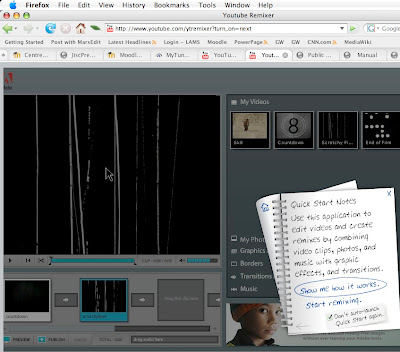
YouTube now have a basic online (browser based) video editor, with very similar tools/interface to that of either iMovie or Windows Movie Maker (It's actually using Adobe Premiere Express! - great advertising move by Adobe - they include a link to 'do more' by using Adobe Premiere Elements 3) - includes a timeline, ability to combine video, phots, music, and graphical effects (Titles, borders, symbols) and transitions! There's also a Flash demo overview. WOW!!!

"About YouTube Remixer

Sometimes, instant gratification video is just the thing you need.

If you've ever uploaded from your cell phone, wished for an easy way to add titles and transitions, or just wanted to remix your own videos, Remixer is a great place to play. It lets you assemble your new video in an easy drag-and-drop timeline, and then publish it right back to YouTube. Your original videos will stay exactly the same."


YouTube also have some other cool features: http://www.youtube.com/testtube


Finally - the mobile version of YouTibe is now live: http://m.youtube.com and you can upload videos to YouTube directly from a video capable mobile phone via MMS - every YouTube account has a 'secret' youtube mms address: xxxxxxxxxxx@mms.youtube.com


Wednesday, June 13, 2007

JISC Conference Summaries

daily summaries of the JISC online conference are available HERE.

Thom & Giedres online presentation on Communities of Practice was well received:
"The Institutional Transformation In Context area also offers a wealth of engaging and interactive experiences. Submissions under the Open call are located in this section, which this year included opportunities to engage in a wiki on using communities of practice to develop educational technology literacy..."

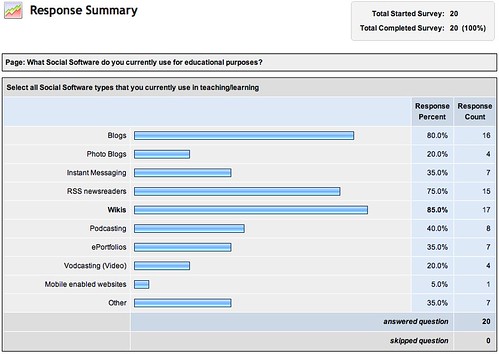
We also ran a short informal survey on participants use of social software in education. Results:
JISCsurveyDay2

Tuesday, June 12, 2007

Mobile Web2 - its almost a reality!

iPhone to Support Third-Party Web 2.0 Applications

Innovative New Way to Create Applications for iPhone

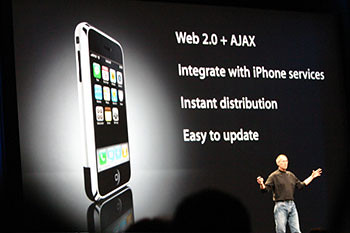
WWDC 2007, SAN FRANCISCO—June 11, 2007—Apple® today announced that its revolutionary iPhone™ will run applications created with Web 2.0 Internet standards when it begins shipping on June 29. Developers can create Web 2.0 applications which look and behave just like the applications built into iPhone, and which can seamlessly access iPhone’s services, including making a phone call, sending an email and displaying a location in Google Maps. Third-party applications created using Web 2.0 standards can extend iPhone’s capabilities without compromising its reliability or security.

“Developers and users alike are going to be very surprised and pleased at how great these applications look and work on iPhone,” said Steve Jobs, Apple’s CEO. “Our innovative approach, using Web 2.0-based standards, lets developers create amazing new applications while keeping the iPhone secure and reliable.”

Web 2.0-based applications are being embraced by leading developers because they are far more interactive and responsive than traditional web applications, and can be easily distributed over the Internet and painlessly updated by simply changing the code on the developers’ own servers. The modern web standards also provide secure data access and transactions, like those used with Amazon.com or online banking.


Safari on Windows - why? - got to be some tie in to the iPhone's capability - Safari synching?!!! on Mac & PC? with iPhone...


jobs_iphone350

"To maintain the security of the iPhone, Apple decided not to let developers write actual applications for the iPhone, but rather create Web 2.0 applications that run within the version of Safari included on the iPhone. Those Web apps can integrate with the iPhone’s built-in services, giving them access to making a call, sending an e-mail, or looking up location in Google Maps. Since most of the application code runs on a server, Apple said the software is both secure and easy to update." via Macworld

Heaps of potential here, particularly with:


  1. Web Clip to widget feature of Safari 3 (Mac & now PC too!)

  2. Dashcode

  3. Create your own widgets - then sync to your iPhone (my thoughts!)


"This application eases the process of creating widgets. It includes all the tools you need, such as an HTML, Javascript, and CSS editor, as well as a library of buttons, shapes, and lines to help lay out the widget. Dashcode includes templates for many types of widgets, including countdown timers, RSS feeds, photocasts, podcasts, and gauges.


Even if you’re not a programmer, you can use one of the templates to make your own official widget—all with absolutely no coding. Drag in an RSS link, for instance, and you’ve created a new RSS widget. While you’ll want to have some coding knowledge to really take advantage of Dashcode, experienced power users may be surprised by what they can do. Widgets built with Dashcode can be submitted to Apple.com for download." Via MacWorld

Friday, June 08, 2007

Dummies2Delight Reflections

Just been brainstorming with Giedre (over coffee) re motivation and success factors in our round two of Communities Of Practice at Unitec.

Why did we get such buy-in from the first D2D compared to its successors?

  1. Key D2D members were concurrently reading/researching the concepts of COPs

  2. D2D members interacted more as peers and beyond the COP official sessions

  3. Second Generation COP members appear to be treating the COPs as a series of traditional 'Workshops' - with too much reliance upon the tech steward/facilitator and little/no peer interaction in between


The implications are that for second gen COPs we have assumed participants have an understanding of the concepts that make COPs unique and successful. DOH! This not being the case - we need to include in the early stages of new COPs an investigation of "what are COPs" and "How do COPs work" - i.e. explicitly emphasize how to nurture COPs.

Wednesday, June 06, 2007

MarsEdit Updated

MarsEdit (my preferred Mac Blogging client) has had a few updates in version 1.2.

  1. Growl support

  2. Picasa image uploading for Blogger.com

  3. Vox blogging


MarsEditIcon128.jpg

Thursday, May 31, 2007

Microsoft Surface

Microsoft have announced their version of the new computer User Interface paradigm 'MULTI-TOUCH' - this is the same UI that will be used in the upcoming iPhone, and has been around for a while, its just taken time to get to a consumer level. However, Microsofts version is still beyond the budget of the consumer at around $10000 US for its 'Surface' coffee table computing device/interface.

Plenty of future potential here for educational environments - good bye to the not-so-'Smartboard'!!!

View video overview here:

Free Educational Content Now Available from iTunes U on the iTunes Store

Free Educational Content Now Available from iTunes U on the iTunes Store: "Apple announces iTunes U. A dedicated area within the iTunes Store, iTunes U features free content – course lectures, language lessons, lab demonstrations, sports highlights, and campus tours — from such leading universities as Stanford University, UC Berkeley, Duke University, and the Massachusetts Institute of Technology. iTunes U, created in collaboration with colleges and universities, allows anyone with access to iTunes to easily extend learning, explore interests, learn more about a school and stay connected with an alma mater."


(Via Apple Hot News.)

Palm Foleo

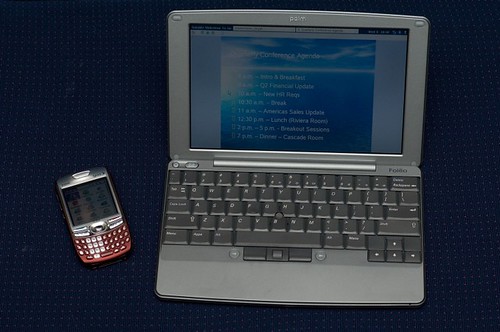
An interesting new product from Palm - not what I expected - a 'mobile companion'. Its basically a wireless keyboard for your bluetooth phone combined with a WiFi Internet tablet (without the touchscreen interface).


Still reserving judgement on this at present - while it appears to be a great product, its size and cost make it equivalent to a cheap laptop (without the wait for bootup times), so convincing students to spring for one will probably meet with the same resistance that convincing them of the need for a PDA did... Now if it was half the price - then it would be a goer.

http://www.palm.com/us/products/mobilecompanion/foleo/web.html

http://www.palm.com/us/products/mobilecompanion/foleo/experience/index.html

Friday, May 25, 2007

Google Calendars go Mobile!

Great news - Google Calendars are now mobile friendly. Simply put the URL http://calendar.google.com/ into your mobile browser to view and add Google calendar events. GREAT!

Although there are a few Google calendar mobile synching utilities around (e.g. GooSync), I've found them quite buggy - and you can end up with multiple event entries. So great stuff not having to mess with synching anymore!

Friday, May 18, 2007

Picasa Slideshow

Picasa now features embedded slideshows (finally), although quite basic compared to slide.com, but still useful.

Here's a slideshow of our Sydney photos from Picasa:


Mouseover slides for options.

Fring Makes Twitter Free

Fring Makes Twitter Free: "


Mobile startup Fring has found a smart way to make itself relevant and useful: by integrating Twitter. For those who aren’t familiar with it, Fring uses your phone’s Internet connection to make VoIP calls, send IMs and use VoIP services (Skype, Google Talk , MSN Messenger and SIP are supported). The addition of Twitter means that you can save on your SMS bill, since Fring works with Wi-Fi or your fixed data plan. So, no extra cost assuming you already have a data plan for your phone.


They’ve even put up a YouTube video explaining the service (embedded below). So does this make you a Fringing Twitterer? Or a Fritter?


Recommended: Piczo Stuff at Mashcodes!


"


(Via Mashable!.)


NOTE: At the moment Fring appears to only support Nokia phones (about 50% of the market), hopefully they widen their user-base soon.

Monday, May 14, 2007

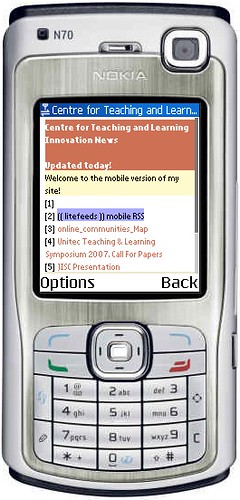
CTLImobilized


CTLImobilized, originally uploaded by thomcochrane.


To see how the ctliblog looks in your mobile phone, type the url http://ctliblog.unitec.ac.nz into your mobile phones web browser (assuming you have a data account).


Or, use an online phone browser emulator such as http://emulator.mtld.mobi/


This Wordpress plugin comes courteousy of http://www.andymoore.info/wordpress-mobile-plugin/

Thursday, May 10, 2007

Shozu test


testing blog from shozu settings

Posted by ShoZu


Web2 Awards for 2007

Seomoz have released their web2 awards list for 2007 - a nice collection of the 'best in category' web2 sites around.

http://www.seomoz.org/web2.0

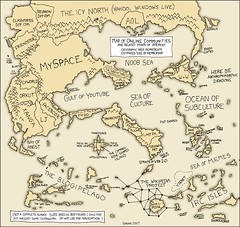
online_communities_Map


online_communities_Map
Originally uploaded by thomcochrane.
From http://xkcd.com/c256.html

A nice pictorial representation of web2 online communities.

Tuesday, May 08, 2007

Mobile Blogging

My presentation for the upcoming CALL Symposium is on Mobile Blogging.
Wiki notes for the presentation are HERE.

View screencast of presentation online at Podomatic.com:
http://thomcochrane.podomatic.com/


Read the paper for the presentation HERE. (Google Documents).


Mobile Blogging Links


For more information on using mobile devices in education, read the author's wiki page:
http://ltxserver.unitec.ac.nz/mediawiki/index.php/MlearningOverview

Saturday, May 05, 2007

Educause Quarterly vol2 for 2007 now online

Educause Quarterly, Volume 30, Issue2 online.

Articles include:
  • Calling All Myth Busters!


  • Always Connected, But Hard to Reach


  • Supporting Student Teaching Through Virtual Classrooms


  • Current Issues Survey Report, 2007


  • E-Learning at a Crossroads—What Price Quality?


  • Lecture Capture: What Can Be Automated?


  • Are You Ready for Mobile Learning?


  • Preparing the Next IT Leaders: Financial Management


  • The Economics of Notebook Universities


  • Clickers in the Classroom: An Active Learning Approach


  • Developing Collaborative Workstations

Wednesday, April 18, 2007

7 Things You Should Know About RSS

7 Things You Should Know About RSS: "RSS is a protocol that lets users subscribe to online content using a "reader" or "aggregator." Internet users tend to settle on preferred information sources. RSS allows users to create a list of those sources in an application that automatically retrieves updates, saving users considerable time and effort.

The "7 Things You Should Know About..." series from the EDUCAUSE Learning Initiative (ELI) provides concise information on emerging learning practices and technologies. Each brief focuses on a single practice or technology and describes what it is, where it is going, and why it matters to teaching and learning. Use "7 Things You Should Know About..." briefs for a no-jargon, quick overview of a topic and share them with time-pressed colleagues. "


(Via EDUCAUSE RSS | Recent Recent Library Submissions Listings.)

Wednesday, April 11, 2007

Sydney Slideshow (Easter 2007)

Slide.com - a fun way to create interactive online slideshows and embed them into your web/blog pages.

Mouse over pictures for description!

Emerging technologies for learning: volume 2 (2007)

Emerging technologies for learning: volume 2 (2007)

This follow-up edition complements the original document published in March 2006 (which is available here)

Download the publication Emerging technologies for learning: volume 2 (2007) (3.2MB)

This publication includes the following chapters:

* Emerging trends in social software for education (Lee Bryant, Headshift)

* Learning networks in practice (Stephen Downes, NRC)

* The challenge of new digital literacies and the 'hidden curriculum' (Jo Twist, ippr)

* How to teach with technology: keeping both teachers and students comfortable in an era of exponential change (Marc Prensky)

* Games in education (Keri Facer, Futurelab; Tim Dumbleton, Becta)

* Ubiquitous computing (David Ley, Becta)


Summaries of each article with download can be accessed here.

Tuesday, April 03, 2007

bfree - export courses from Blackboard

bfree - export courses from Blackboard: "http://its.unc.edu/tl/tli/bFree/

Another useful pointer from Michael Roy at Wesleyan’s Academic Commons, bFree is a tool built by the University of North Carolina at Chapel Hill. It allows you to open a Blackboard course export or archive file, select the files you want and then export these as an independent website."


(Via EdTechPost.)

Sunday, April 01, 2007

Sony PSP users can now connect to T-Mobile Hotspots

Sony PSP users can now connect to T-Mobile Hotspots: "Sony recently announced a new firmware upgrade, version 3.30, for the PSP PlayStation Portable system. The update now enables PSP users access to over 7,000 T-mobile hot spot locations, including starbucks, Borders, Hyatt Hotels, and many major airports across the..."


(Via MobileWhack.)

Vox.com, Meet A&R

Vox.com, Meet A&R: "


UK record companies don’t want your demo CDs anymore: they want you to use Vox.


SixApart’s blogging platform is being used by ColumbiaDemos and RCADemos, two sites owned by SonyBMG, to solicit demos from artists rather than accepting CDs. From April 2nd, aspiring artists will be able to sign up on the sites and create multimedia blogs using the Vox software.


Whether a blogging platform is the best way to solicit new music is questionable, but no doubt this is part of a multi-pronged strategy that includes talent hunting on YouTube, MySpace and other hubs.


[via]


Recommended: Hi5 Layouts at Mashcodes!


"


(Via Mashable!.)

Thursday, March 29, 2007

Blogging from Sydney

I've spent the first 3.5 days in Sydney feeling very disconnected - the Hotel only has dialup (very Sloooow dialup at that), and my Vodafone 3G Data costs $10/MB on roaming!
I tried every Telco in Australia to signup for data for 2 months - but no joy - they all want you to sign up for at least 2 years! and you have to have an Australian credit rating (bank account), and Australian employment! WHAT'S WRONG WITH THESE PEOPLE!!! This is so neanderthal.
Anyway, the Chilli iburst wireless broadband package finally arrived today - so I'm connected again! A nice service - very similar technology to WOOSH in NZ, but much better coverage.

Photoblog of Sydney available at http://picasaweb.google.com/thomcochrane/Sydney2007

Sunday, March 18, 2007

Wednesday, March 14, 2007

IT Helpdesk & new technology - an age old problem ;-)

[youtube=http://www.youtube.com/watch?v=xFAWR6hzZek]


http://www.youtube.com/watch?v=xFAWR6hzZek


Get With The Program


An article in the latest New Zealand TUANZ Topics magazine asks "Are web2 communication tools such as blogs, wikis, webcasts and podcasts now an essential part of the teacher's toolkit?" (From a secondary school perspective)

They conclude:

"You and I are the last generation that has the perogative of deciding whether or not we're going to embrace technology. But the kids we are teaching noe, the ones that are under my watch in the classroom, they aren't given that same perogative. If they don't master these skills, I'm actually dooming them to a lower level of opportunity
...

The thing we need to understand about the type of learners coming to us today is that not only do they have different tools, but they actually process differently.

Most kids are walking around with one or two cellphones in their pocket, using them to text their friends, surf the Web, take photos, and post to their blogs. And yet as soon as they get to school they're told to turn the cellphones off.

If we'd just let students work to their strengths, instead of their weaknesses, we'll start to celebrate what they can do, and what they come to the classroom with - and that is a propensity toward technology."

Putt, S. (2007, March/April). Get with the program. TUANZ Topics, 17, 35-38.

Tuesday, March 13, 2007

Welcome to Treemo - Treemo: Media Sharing on a Mission

Welcome to Treemo - Treemo: Media Sharing on a Mission: "Treemo is an online and mobile community dedicated to sharing digital media, empowering self-expression, and transforming creativity into action."


Treemo looks rather interesting - all content is mobile friendly, and they provide multiple ways of accessing content & uploading content via mobile devices without requiring a client application:

  1. Via Cell Phone Number

  2. Via Mobile Web Browser

  3. Via MMS

  4. Via email

  5. Or from PC online


Definitely worth checking out. They are also quite strict on content - copyright, etc...

Tuesday, March 06, 2007

Wednesday, February 28, 2007

The 1% 'rule'

Here's an article that discusses the 1% rule of online content creation!

"It's an emerging rule of thumb that suggests that if you get a group of 100 people online then one will create content, 10 will "interact" with it (commenting or offering improvements) and the other 89 will just view it".

Sad but true - how can we get over the 1% threshold? Ideas?

Friday, February 23, 2007

SMS Post

Wireless 3G connectivity. Its great to have connectivity via wireless technology, enabling things like mobile blogging via sms!

Via Letmeparty.com

Create a free account with http://www.letmeparty.com , register your Blog address (e.g. http://puriri.unitecnology.ac.nz/wp/xmlrpc.php ) and your cellphone number, send a text message to +13128047068 , and you're mobile blogging!

Why bother?

“New mobile and context-aware technology can enable young people to learn by exploring their world, in continual communication with and through technology” (Sharples, 2005).

“A review of current practice suggests that mobile and wireless learning is the natural next step wherever institutions and practitioners have already adopted e-learning” (JISC, 2005b).

Sotillo (2003, p5) describes the pedagogical impact of ubiquitous wireless computing:

In summary, the advantages of wireless computing in education are ubiquity, portability, and flexibility for collaborative learning projects. Computer power everywhere and all the time means the ability—and the challenge—to integrate computers into every aspect of teaching, learning, and research. This represents a Copernican revolution in instruction, with the professor as guide and mentor rather than "fount of knowledge" or ultimate classroom authority.

Tuesday, February 20, 2007

DipLSD Mobile Trials 2007

Got a really encouraging response to suggestions for setting up mobile web2 trials with the Diploma Landscape Design course at Unitec today!

Trial goals so far:

  1. Students purchase their own Palm Treo 680, and monthly data plan

  2. Regular weekly technology support/exploration sessions

  3. Tentative Dates:

    March 12, 19, 26?
    May 14, 21, 28

  4. Project culminates in eportfolio for Ellerslie Flowershow

  5. Setup COP with DipLSD staff

Monday, February 19, 2007

MOLTA Conference disappointing


MOLTA Conference
I was a bit stunned at the limited understanding of web2 technologies (over half the audience had not heard of RSS!) by conference attendees! Many of the presentations were out of date - promoting 3-4 year old technologies, and badly informed on the current state of wireless data in NZ! :-(
I was also frustrated by the persistence in developing institution specific applications - instead of using the fantastic web2 mobile applications tat are already available!!!

One of the exceptions was Selena Chans workon mobile eportfolios and web2 mashups, including the use of VOX. Interesting restyling of Moodle using 'Firebug' plugin for Firefox, to make it more mobile 'friendly'.

Saturday, February 10, 2007

WordPress

I've been experimenting with WordPress recently - and so far I'm quite impressed with its ease of setup and options, particularly the ability to associate 'static' pages with your main blog page. Thus you could almost use Wordpress as a basic website solution.


http://www.wordpress.com

Mobile plugin for wordpress available at http://alexking.org/projects/wordpress

Wednesday, February 07, 2007

Google Blogger Widget

Google have produced widgets for OSX for both Blogger & GMail! Cool.

Tuesday, February 06, 2007

Monday, February 05, 2007

Scratch All Future Conference Presentations on Web 2.0

Scratch All Future Conference Presentations on Web 2.0: "Scratch All Future Conference Presentations on Web 2.0
And maybe instead, we can get it with 5 minutes, no bullet points, no lecturing in Web 2.0 … The Machine is Us/ing Us, a YouTube gem:

This comes from Digital Ethnography @ Kansas State University, ‘a working group of Kansas State University students and faculty dedicated to exploring and extending the possibilities of digital ethnography.’"


(Via CogDogBlog.)

Wednesday, January 31, 2007

Interesting Time Magazine Articles

I really should read Time Magazine more often! I came across an issue brimming with Web2 articles from December 25 2006 - #51.

Web2 (or more directly YOU) is named 'person of the year' for 2006!!!

A good overview of Web2 - plus a nice image mind-map of web2 services (only in print version).

An overview/history and early video of YouTube development.


Also of interest:
Overview of "World of Warcraft".

iPhone Flash Demo.

Thursday, January 25, 2007

Surgery Recovery Tools


  1. Panadol

  2. Watch - to while away the dragging hours

  3. 3G cellphone to keep in contact & read RSS feeds, blog etc...

  4. Bible - spiritual rejuvenation required!

  5. Wireless Laptop - they need longer life batteries!!! - hence 3G cellphone higher in list!

  6. A good fiction book - but hard to concentrate enuff to read much for first few days!

  7. iPod - with a large library! Stops insanity

  8. And MOST IMPORTANTLY - should be first in the list - a loving wife! and friends


  9. Oops - and don't forget PRAYER - faith that keeps you from falling over the edge into despair when nothing seems to make sense!

Prostate Cancer Research

From NZ Herald A12 Thursday 25 Jan 2007 - Research indicates eating 2-3 servings of tomatoes along with 1.5 cups of broccoli daily reduces cancer cell growth by 30%

[ Sent from my mobile phone using the Blogger widget from www.bluepulse.com ]

Wednesday, January 24, 2007

Wimax at EIT!!!

Trans-Tasman broadcast and telecommunications technology provider Kordia has secured the New Zealand distribution rights to RoamAD’s networks, which it plans to deploy throughout the country.

The partnership of the two companies won its first New Zealand contract before Christmas, coming top of five bids to build a wireless access solution for the Eastern Institute of Technology (EIT) in Hawkes Bay.

Kordia chief executive Geoff Hunt said Kordia (which was until recently known as THL Group) will develop more applications and is willing to work with other content and service providers in the Wi-Fi arena.

“This deal with RoamAD and EIT Hawke’s Bay is our first step towards increasing ease of use and the utility of Wi-Fi networks throughout New Zealand,” he says.


Wow - not bad thinking for a 'small' regional Polytechnic with 3000 EFTS!

Original Article here.

NMC 2007 Report at EDUCAUSE ELI

Get Horizon! at EDUCAUSE ELI: "Okay, this was just the fun part. The six topics:


Time to Adoption 4-5 Years:

The New Scholarship and Emerging Forms of Publication

Massively Multiplayer Educational Gaming


Time to Adoption 2-3 Years:

Mobile Phones

Virtual Worlds


Time to Adoption One Year or Less:

User-Generated Content

Social Networking"


(Via CogDogBlog.)

Sunday, January 14, 2007

Gmail

By forwarding pop3 mail to Gmail i can pick it up on my mobile devices - Cool!

[ Sent from my mobile phone using the Blogger widget from www.bluepulse.com ]

Thursday, January 11, 2007

Bits & Pieces

1. I've been using google reader mobile on my cell phone for RSS feeds - getting used to the interface, although I still prefer NetNewsWire Lite on my Mac (with Newsgator synching).

2. http://www.vox.com looks like a nice featured blogging host, with growing mobile features.

3. The Google synch plugin for Firefox is a great way to synchronize bookmarks and settings between Firefox on multiple computers - very similar to .Mac synching for Safari.

4. The Apple iPhone looks very cool - could be the perfect UMPC device for education!!! (especially with the uptake of podcasting in education already...)