Saturday, June 28, 2014


Friday, October 19, 2012
Tuesday, July 26, 2011
Mobile Moodle Workshop

Some of the people in the mobile workshop, all busy with our iPads. #mootnz11
Workshop Notes:
http://thomcochrane.wikispaces.com/Mobile+Moodle+Workshop
Wednesday, July 20, 2011
Sharefest Augmented Reality Workshop

Participants decoding QR Code to workshop notes : http://tinyurl.com/6f2mut9
Friday, July 08, 2011
#ECE11 Conference Salford Uni Workshop
Wednesday, April 13, 2011
Bridging Contexts with Technology Stewards
Thursday, April 07, 2011
Zoho Docs Comes to the iPad
Zoho Docs Comes to the iPad: "
 Zoho has brought its popular online productivity tools Zoho Docs to the iPad.
The app is designed to give you mobile access to your Zoho documents, including those created in Zoho Writer, Sheet, Show, and Docs (the word processing, spreadsheet, and presentation applications). You can also view shared documents via the app.

"
(Via Read/WriteWeb.)
Wednesday, March 30, 2011
Mobiles in Education
Well worth a read of several very interesting articles.
Vimeo launches app to create, edit, share videos
Vimeo launches app to create, edit, share videos: "Vimeo launches app to create, edit, share videos"
(Via iPhone Central.)
Thursday, March 17, 2011
GarageBand for iPad – MIDI Messages and Key Mappings
GarageBand for iPad – MIDI Messages and Key Mappings: "GarageBand for iPad – MIDI Messages and Key Mappings"
(Via iOS MIDI.)
Midi messages supported so far:
CC 1 – Modulation (in keyboard, for synths etc)
CC 7 – Current Track volume (only works in instrument mode, not in arrangement mode)
CC 8 – Current track pan (only works in instrument mode, not in arrangement mode)
CC 64 – Sustain Pedal
Channel Aftertouch
Pitch Bend
Sunday, January 16, 2011
Slideshare overview of Mobile Tagging
http://www.slideshare.net/mobile/PSFK/psfk-presents-future-of-mobile-tagging-report
Sent from my iPad
Friday, January 14, 2011
Thursday, December 09, 2010
Mobile and Wireless Technologies Review
Mobile and Wireless Technologies Review: "A review of the literature on the use of mobile and wireless technologies for learning and teaching in UK further and higher education, from JISC (UK).
"(Via m-Learning latest items.)
Tuesday, September 28, 2010
Blackberry Playbook Announced
http://na.blackberry.com/eng/?2&RMID=MR00300_GL_EN_MU_2010-09-27_BB_Teaser&RRID=4C323FB9E5B2257CE10000000A506748

- * 3 MP high definition forward-facing camera
- * 5 MP high definition rear-facing camera
- * Codec support for superior media playback, creation and video calling
- * 1080p HD video; H.264, MPEG4, WMV HDMI video output
- * Micro USB, Micro HDMI, and DLNA media streaming
- * Flash 10.1 support
- * 7 inch screen
- * Capacitive multi-touch
- * Blackberry Tablet OS
- * 1GHz Dual core processor, 1GB Ram
- * Pair BlackBerry® PlayBook with a BlackBerry smartphone via secure Bluetooth® connection - other mobiles???1
- * Blackberry Appworld - currently 8353 apps, and 2428 themes - compare with 50000+ for Android and 250000+ for iOS
Thursday, September 23, 2010
Slideshare on Open Context Model - featuring Unitec (slide13-14)
Tuesday, September 21, 2010
New iOS apps - particularly for iPad
- VLC now available for iPad - view any video file!
- Slideshare app for iPad - Slide by Slide
- Google announce Google Docs editing coming to iPad soon
Android 2.2 Update
The update brings several obvious new features:
- 3G to WiFi Hotspot app
- Navigation
- Flashlight
- Graphics appear better
- Better quality Video recording
- And other stuff I haven't found yet
Definitely worth the update, and nice that the update was painless. I'm liking Android - apart from the dodgy adds you get in some free apps.
Tuesday, September 14, 2010
MLearning Projects at Unitec 2007-2010
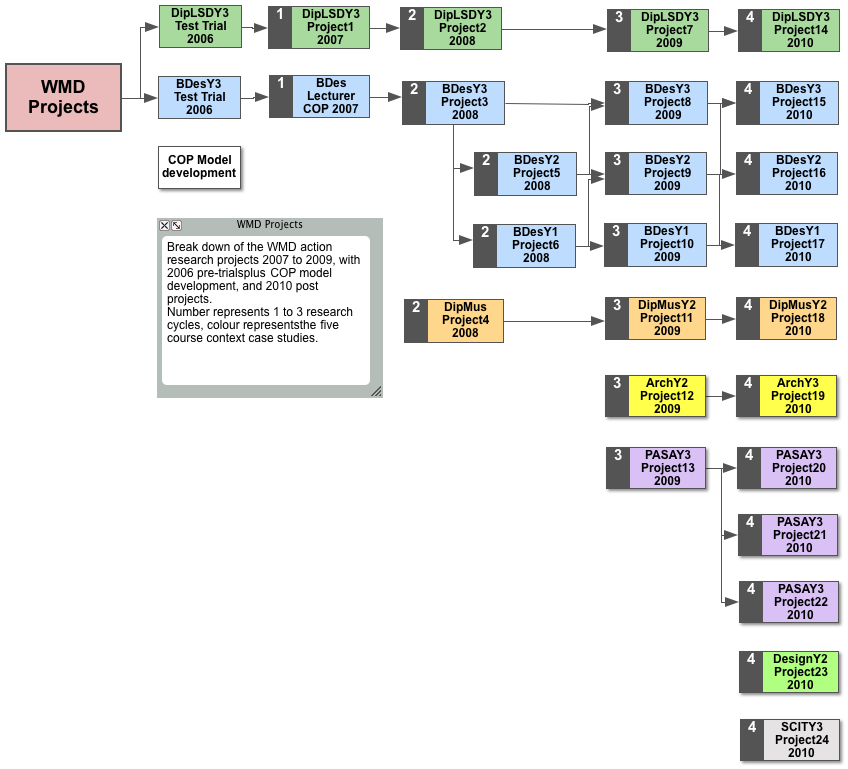
Higher Resolution version: HERE
Tuesday, September 07, 2010
Mobile Blogging options for Typepad & Wordpress
You can upload/post to Typepad from your mobile phone in several ways:
- Use the mobile browser http://i.typepad.com
- Email upload – find your Typepad upload email in your Typepad profile and add as a contact on your phone – then either MMS to it or use GMail on your Phone to mail posts to Typepad.
- Download the Typepad App from either the iTunes App Store (iPhone/iPad), or CellSpin from the Android Market (Android Phone), or CellSpin from the OVI STore (Nokia) on your phone
- Install Pixelpipe on your phone & link to Typepad as a ‘Pipe’
- Install the HelloTXT app on your (iPhone/iPad, or Android) phone
- See http://help.sixapart.com/tp/us/typepad_mobile.html for more options.
You can upload/post to WordPress from your mobile phone in several ways:
- Use the mobile browser http://m.wordpress.com
- Email upload – find your WordPress upload email in your WordPress profile and add as a contact on your phone – then either MMS to it or use GMail on your Phone to mail posts to WordPress.
- Download the WordPress App from either the iTunes App Store (iPhone/iPad), or the Android Market (Android Phone), or from the OVI STore (Nokia) on your phone
- Install Pixelpipe on your phone & link to WordPress as a ‘Pipe’
- Install the HelloTXT app on your phone


 Posts
Posts

