Wednesday, November 04, 2009

Sony Ericsson Xperia X10 announced

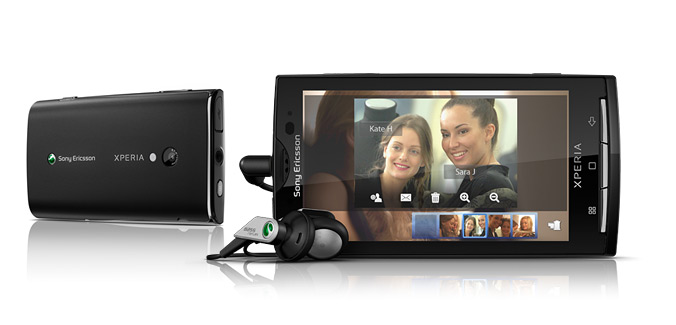
Sony Ericsson have formally announced their first Android-based smartphone, the Xperia X10. Looks promising:

X10-see-the-product-1.jpg


X10-see-the-product-2.jpg


Find more info and specs at the website:

http://www.sonyericsson.com/cws/products/mobilephones/overview/xperiax10?lc=en&cc=nz

Saturday, October 31, 2009

Google Maps Navigation

WooHoo - the beginnings of FREE GPS based navigation via Google Maps - not yet available for NZ however :-(

Thanks Martin Boult for the heads-up on this!


Read more at http://www.voxy.co.nz/technology/google-maps-and-takes-over-world/893/28865


Wednesday, October 28, 2009

Context in Mobile Learning

Slideshare presentation from Mike Sharples, defines 'context' according to

  1. The "Shell" concept

  2. OR the "Constructive Interaction" concept

Thursday, October 15, 2009

Deakin mlearning presentation

Kindergarten Teacher's technology kit


Every Auckland Kindergarten Teacher is now suppied with a wireless Mac laptop and digital camera. Kindys also have WiFi access to facilitate authentic learning anywhere!

Wednesday, October 14, 2009

Add YouTube, Facebook, Picasa and Twitter to Nokia Shareonline

There's a nice tutorial at nokiausers.com on how to configure Nokia's Shareonline service to add Youtube, Facebook, Picasa and Twitter (as well as the default Ovi, Vox and Flickr services).

AdditionalShareonlineConfigs.jpg


First - signup online for the sites you want to add (YouTube, Picasa, Twitter etc...). If you already have logins to these you are good to go to setup Shareonline:


  1. On your Nokia mobile phone web browser go to http://furtiv.mobi/beta_instructions.html, or scan the following QR Code to take you direct to download the Shareonline config files for YouTube, Picasa, etc...


    FurtivLinkqr.png


  2. Now click on each of the links you want to setup on Shareonline

  3. After download, switch to Shareonline on your phone, select the new 'ready for activation' services, login to each and they will be activated

  4. Happy Mobile sharing!

Tuesday, October 13, 2009

Saturday, October 10, 2009

World ICT Facts

Report from international telecoms union: the world is mobile, read this report http://www.itu.int/ITU-D/ict/material/Telecom09_flyer.pdf
  • Mobile cellular has been the most rapidly adopted technology in history. Today it is the most popular and widespread personal technology on the planet, with an estimated 4.6 billion subscriptions globally by the end of 2009
  • Mobile broadband subscriptions overtook fixed broadband subscribers in 2008, highlighting the huge potential for the mobile Internet
  • In 2009, more than a quarter of the world’s population are using the Internet


MobileMarketshare2009.jpg

Coffee in St Kllda, Electra cycle my wife likes.

Friday, October 09, 2009

Thursday, October 01, 2009

Wednesday, September 30, 2009

Flexible presentation in UCOL Hub


Portable presentation trolley in use

Flexible presentation in UCOL Hub

Flexible presentation in UCOL Hub

Tuesday, September 29, 2009

Friday, September 18, 2009

AVIARY - online Image and audio editor

AVIARY http://aviary.com is a set of media recording and editing tools that work inside of your web browser - a powerful 'cloud computing' tool. It's key features include:

  • Photo Editor (including masks)

  • Vector image editor - c.f. Freehand/Illustrator

  • Screen Capture

  • Multitrack Audio Editor and Recorder - e.g. Garageband, a nicer interface than Audacity!


Video Intro to Aviary:


Video Intro to the Aviary Audio recorder/editor (Myna)

  1. Visual Waveform editor

  2. Automation

  3. Effects

  4. Import/Export

  5. Share sessions


Example Myna Session:


denis.egg by denistuning on Aviarydenis.egg by denistuning on Aviary

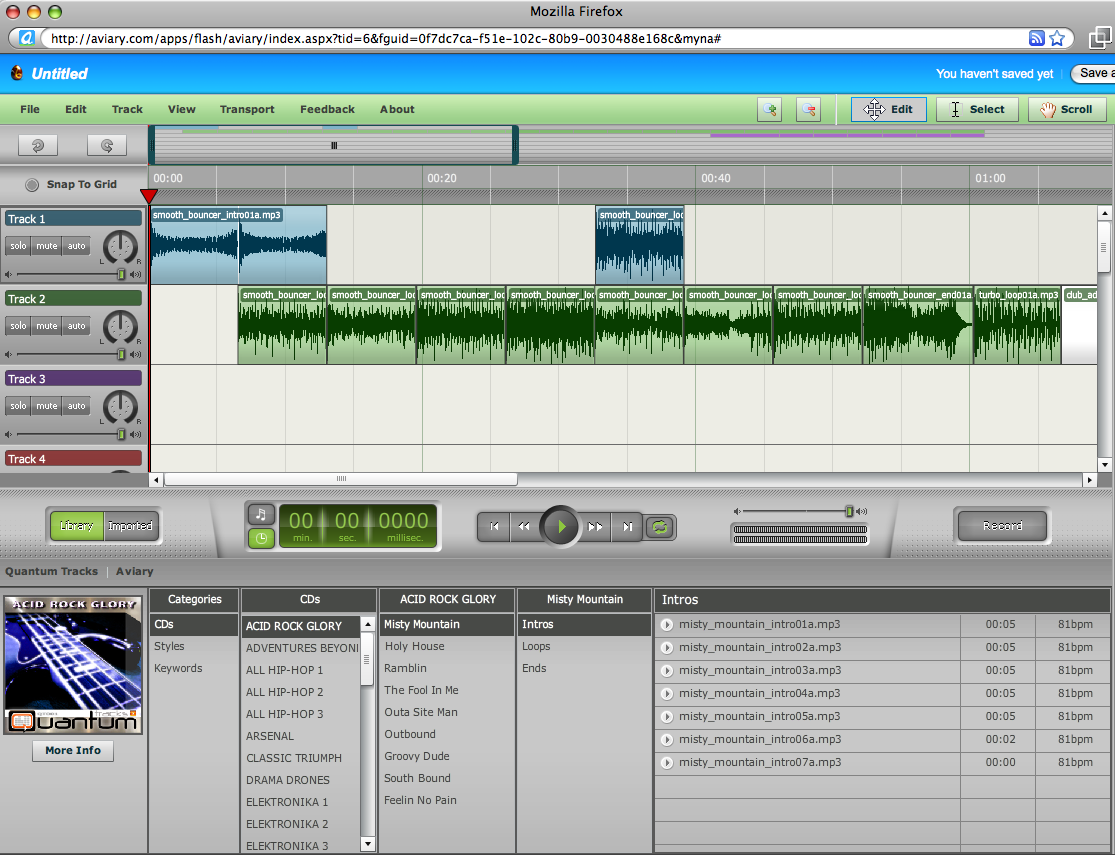
Screenshot:

AviaryMynaEditor.png

Monday, September 14, 2009

Learning Space Design


Students preferred learning space ezample!

Saturday, September 12, 2009

Livestream - create your own free online TV station

Free online Video streaming tools:

  1. Livestream

  2. uStream


Collate and stream your YouTube videos, live webcam, and even smartphone camera (ustream only), creating a virtual TV station! Great for presenting/sharing compilations of presentations, student projects, events, etc...

http://www.livestream.com


uStream