Links to notes and presentations for the Education in a Changing Environment Conference at Salford University, presented by @fredgarnett and @thomcochrane (remotely from New Zealand):
Showing posts with label web2. Show all posts
Showing posts with label web2. Show all posts
Friday, July 08, 2011


Thursday, April 07, 2011
Zoho Docs Comes to the iPad
Zoho Docs Comes to the iPad: "

The app is designed to give you mobile access to your Zoho documents, including those created in Zoho Writer, Sheet, Show, and Docs (the word processing, spreadsheet, and presentation applications). You can also view shared documents via the app.

"
(Via Read/WriteWeb.)
Monday, November 15, 2010
Mobile Internet Finally Mainstream?
You know that mobile web 2.0 is finally mainstream when over 50% of a standard issue PC magazine is devoted to mobile computing and mobile web 2.0!

- e.g. November 2010 issue of NZ PC World http://www.pcworld.co.nz
- Also breaking stories in NZHerald and Newsweek feature mobile:
- How the Cell Phone Is Changing the World - Newsweek http://bit.ly/c3bgdG
- Smartphone wars in time for Christmas - Technology - NZ Herald News http://t.co/xSHlvxc
Saturday, October 23, 2010
Paper.Li
Paper.Li is a cool way to create a daily 'newspaper' from RSS feeds and hashtags.
http://paper.li/
e.g. http://paper.li/tag/mlearn2010
http://paper.li/
e.g. http://paper.li/tag/mlearn2010
Thursday, September 23, 2010
Web 2.0 Meme Map
Web 2.0 Meme Map from Tim OReilly: A nice overview of the core concepts characterising Web 2.0
http://www.readwriteweb.com/archives/web_20_meme_map.php
Original: http://www.flickr.com/photos/timoreilly/44349798/
http://www.readwriteweb.com/archives/web_20_meme_map.php
Original: http://www.flickr.com/photos/timoreilly/44349798/
Slideshare on Open Context Model - featuring Unitec (slide13-14)
Fred Garnett's presentation on the "Open Context Model of Learning" features the use of Thomas Cochrane's (Unitec, New Zealand) research on learner-generated contexts and learner-generated content using WMDs (Wireless Mobile Devices) and Web 2.0 as examples of implementing the Pedagogy-Andragogy-Heutagogy (PAH) continuum - see slides 13-14 in the embedded presentation below.
Tuesday, September 14, 2010
MLearning Projects at Unitec 2007-2010
Map of progress of the mlearning (Wireless Mobile Device or WMD) projects at Unitec.
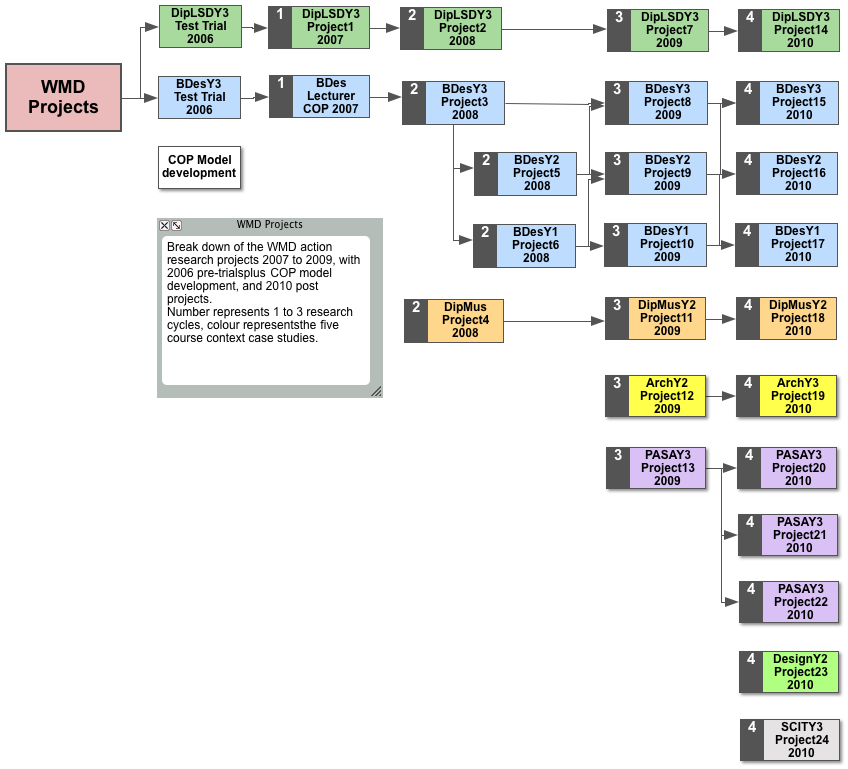
Higher Resolution version: HERE
Higher Resolution version: HERE
Monday, September 06, 2010
Vox Migration Plan
As you have probably heard - Vox, our preferred free Blog/eportfolio site is closing down on 30 September. You will need to choose an option to move and export your Vox blogs to either: Typepad, Wordpress or Posterous (there is no simple export to Blogger or other Blog hosts beyond these three). The import to Typepad is quick and simple, the Wordpress and Posterous import can take several hours.
So - which to choose?
Well there's really not a lot of difference between Typepad and Wordpress anymore, and your choice either way will be fine, however I'll outline what I see as the key differences (PS, I have, and still use: Blogger since 2004, Wordpress since 2006, and Vox since 2007, effectively keeping three copies of blog posts and tweaking each site for different audiences).
Unfortunately none of the current free options provide the range of functionality that made Vox so useful for collaborative student projects, however this can be achieved by using a 'bricolage' of tools - i.e. Typepad or Wordpress for student blogs, turning on the Auto Tweet option for posts in Typepad & Wordpress for creating community and social networking, using RSS subscriptions to follow activity (e.g. using Google Reader), and using Flickr or Picasaweb for hosting and presenting images, and Google Docs for collaborative documents.
Both Typepad and Wordpress feature the ability to create static pages associated with your main blog, and their themes are more customisable than Vox with both offering add-on free widgets. They are both also more iPhone/iPad friendly than Vox, and provide limited free blog-view statistics options.
1. Typepad:
http://thomcochrane.typepad.com/
The Typepad import is the easiest.
Typepad includes a 'follow' option that is similar to Vox's 'neighbourhood' feature for building online community.
Only the Typepad 'Micro' option is free - however the import from Vox feature appears to give free users more feature access than standard Typepad Micro, and is add-free.
Typepad's more powerful customisation and community tools are paid upgrades.
There are several iPhone/mobile editing apps available for Typepad blogs, but no free iPad editor yet.
The paid Typepad options offer more flexibility than Wordpress.
http://www.typepad.com/features/the-right-choice/
Mobile version: http://itypepad.com
Also support for email upload and blogging
2. Wordpress:
http://thomcochrane.wordpress.com/
Wordpress offers more customisation for free than Typepad, although media hosting for free is limited, including no video (you can still embed YouTube etc in posts for free) - paid upgrades provide video hosting and larger media allowances on Wordpress.
There are a couple of free iPad Wordpress Blog editing apps available.
Wordpress uses custom embed code for externally hosted media - that can take getting used to.
http://en.wordpress.com/products/
Mobile version: http://m.wordpress.com
Also support for email upload and blogging
So depending on what is most important to you you can choose either Typepad or Wordpress and have made a good choice!
The simplest option in my opinion is Typepad Micro.
Hope this helps.
Thom.
Sunday, July 25, 2010
Semester2 WMD Projects
Last week we started five WMD projects:
- Student-owned devices within MIP2 paper of Product Design Year1
- iPhones with netbooks for the iPhone Development computing course
- HTC Androids with 3rd year Architecture students
- Nokia Xpressmusic 5800 smartphones with 2nd year Graphics Design course
- Nokia N97 smartphones with the 3rd year Film and Television students.
Some pics below.
 |
| Semester2 2010 WMD Projects |
Friday, July 09, 2010
Tuesday, June 22, 2010


Thursday, June 17, 2010
Tuesday, March 09, 2010
Twitter Tales
We are using Twitter to communicate between New Zealand, Ireland and Chile for a collaborative Product design student project.
Students have setup Twitter accounts and begun 'tweeting', with their Lecturers also using Twitter to respond, guide and inform their students during the project.
Serendipitously, an online PODCast show host has chosen one of our students at random to get them to the top of the twitter followed list and make them famous!
Lisa's "I hate technology" tweet caought the PODCast show hosts eye and recommended all his listeners follow her on Twitter. 24 hours later she has over 8600 followers. The goal is to get more than 15000 followers in a week, and one of Lisa's follows (at random) will win an Apple iPod from Leo Laporte, as will Lisa herself!
Lisa's Twitter page: http://twitter.com/LisaTickledPink
Leo has also taken Lisa to the top of DIGG: http://digg.com/comedy/Leo_Laporte_takes_a_stranger_to_the_top_of_Twitter
Leo Laportes PODCast show: http://twit.tv
Episode on "I Hate Technology" - watch the video from 24 minutes to 30 minutes, and 1 hour 26 minutes to view the sections on Lisa's story! http://twit.tv/238

Monday, December 07, 2009
Conceptualising Web 2.0
Conceptualising web 2.0 Bower et al http://yfrog.com/4f456qj

Mapping web 2.0,Bower et al, Ascilite09, don't agree with several of the classifications - determined by underlying pedagogical use http://yfrog.com/33wqwj
Friday, September 18, 2009
AVIARY - online Image and audio editor
AVIARY http://aviary.com is a set of media recording and editing tools that work inside of your web browser - a powerful 'cloud computing' tool. It's key features include:
Video Intro to Aviary:
Video Intro to the Aviary Audio recorder/editor (Myna)
Example Myna Session:
 denis.egg by denistuning on Aviary
Screenshot:
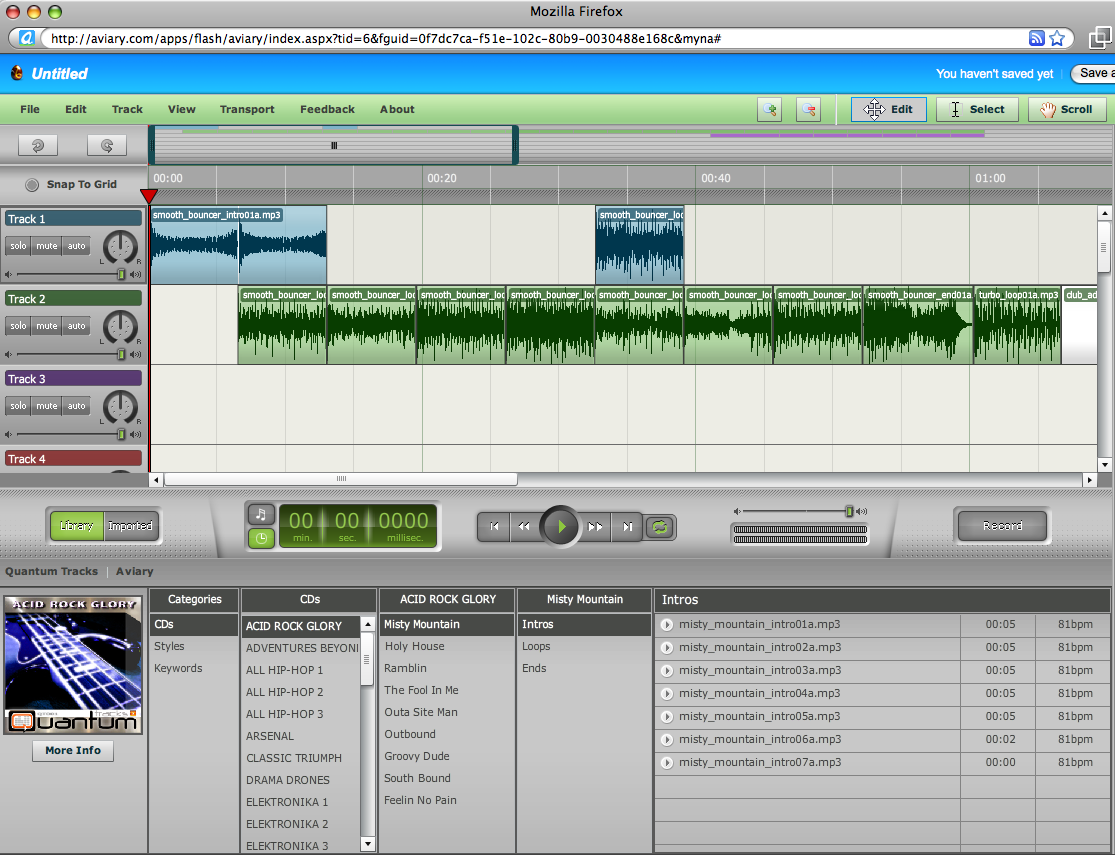
- Photo Editor (including masks)
- Vector image editor - c.f. Freehand/Illustrator
- Screen Capture
- Multitrack Audio Editor and Recorder - e.g. Garageband, a nicer interface than Audacity!
Video Intro to Aviary:
Video Intro to the Aviary Audio recorder/editor (Myna)
- Visual Waveform editor
- Automation
- Effects
- Import/Export
- Share sessions
Example Myna Session:
denis.egg by denistuning on AviaryScreenshot:
Tuesday, September 08, 2009
Intentional Communities Of Practice
Here's an overview of the development (2006 to 2009) of an intentional Communities OF Practice model for Academic Professional Development. This grew out of the Dummies2Delight group started in 2006, and has grown into a model for creating and supporting collaborative teaching and learning projects with a technology steward (CTLI/TPA) lecturers and their students.
Video Overview (With focus on mobile web 2.0 projects development):
For more background info on COPs, see Wenger's introduction website and one-page COP setup guide:
- Dummies2Delight Overview 2007: http://docs.google.com/View?id=dchr4rgg_46dw5q29gj
- Community Of Practice invite (2007 original): http://docs.google.com/View?id=dchr4rgg_47g7cxz2f6
- First collaborative COP report 2007:

From Dummies2Delight - Moving Mobile Mainstream (Via Communities Of Practice) 2007: http://docs.google.com/View?id=dchr4rgg_9d4c5z4sw
- CTLI Minisymposium 2007 - COP "Show & Tell". http://www.youtube.com/watch?v=90ORtMXVW2M
- Just What Is A Community Of Practice? (2008): http://docs.google.com/View?id=dchr4rgg_1ft6g3fhp
- Community Of Practice Outline 2008: http://docs.google.com/View?id=dchr4rgg_6dfm64xdd
- Example COP Invite (SPASA 2008): http://docs.google.com/View?id=dchr4rgg_2qhmt3kg6
- TPA Minisymposium 2009: Example COP feedback.
1. http://www.youtube.com/watch?v=j9rK9VKR11Y
2. http://www.youtube.com/watch?v=9HV7Yh3JLss
3. http://www.youtube.com/watch?v=6krZJJ12GCQ
Video Overview (With focus on mobile web 2.0 projects development):
For more background info on COPs, see Wenger's introduction website and one-page COP setup guide:
- Wenger, E. (2005, 14 October). Communities of Practice: a brief introduction Retrieved 17 July, 2006, from http://www.ewenger.com/theory/index.htm
- http://www.ewenger.com/theory/start-up_guide_PDF.pdf
Wednesday, August 12, 2009
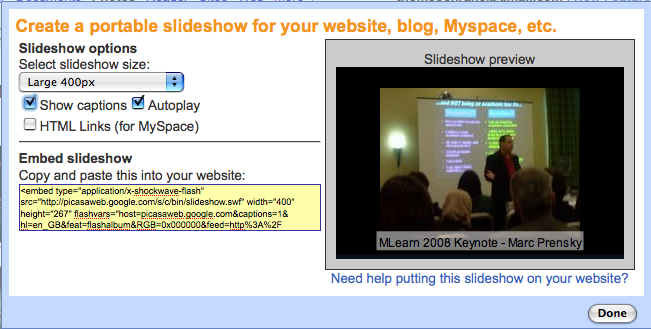
Picasaweb Slideshows
Picasaweb: Interactive Slideshows!
- Use your GMail addrerss to create a free picasaweb account
- Upload Photos to an 'album' on your Picasaweb (use 'Pixelpipe', Shozu or email upload from the XM5800)
- Annotate your uploaded photos
- Geotagged photos will be added to Google Maps - or you can add your pphotos to Google maps manually in your Picasasweb album.
- Embed your album as an interactive slideshow in VOX
- Comment on each others picasaweb photos!

Tuesday, July 28, 2009
Film & TV mlearning rollout
You can edit movies directly on the XM5800 smartphone - it includes a basic movie editor similar to iMovie on it - you can cut, paste clips together, add effects and soundtrack, and text/titles directly on the phone, then upload the edited movie to your chosen online site.
To access the movie editor on the XM5800, go to the gallery application, choose a movie, then choose 'options', 'edit' then choose editing options.
e.g. http://www.youtube.com/watch?v=Ct5iBSz8ai4
"Film and TV third year students receive netbooks and smartphones for mlearning project at Unitec. Video and images recorded on an N97, video edited on N97, uploaded directly from N97 via Shareonline/Pixelpipe"
http://pixelpipe.com/item/a3b706e5-f335-4199-accf-4268b774b2a3
Tuesday, June 30, 2009
EDULearn Conference09 Virtual Presentation
A short video introduction to our collaborative research paper presentation at the EDULearn09 Conference in Barcelona, 6-8 July 2009.
By Thom Cochrane, Unitec, New Zealand. Paper: "Mobilising Learning: Mobile Web2.0 Scenarios in Tertiary Education." Wiki Link for more info: http://ctliwiki.unitec.ac.nz/index.php/MobilisingLearning
Cochrane, T., Bateman, R., Cliffin, P., Gardner, J., Henderson, I., & Holloway, S. (2009, 6th to 8th July). Mobilizing Learning: Mobile Web 2.0 Scenarios in Tertiary Education. Paper presented at the EDULEARN09 the International Conference on Education and New Learning Technologies, Barcelona, Spain.

By Thom Cochrane, Unitec, New Zealand. Paper: "Mobilising Learning: Mobile Web2.0 Scenarios in Tertiary Education." Wiki Link for more info: http://ctliwiki.unitec.ac.nz/index.php/MobilisingLearning
Cochrane, T., Bateman, R., Cliffin, P., Gardner, J., Henderson, I., & Holloway, S. (2009, 6th to 8th July). Mobilizing Learning: Mobile Web 2.0 Scenarios in Tertiary Education. Paper presented at the EDULEARN09 the International Conference on Education and New Learning Technologies, Barcelona, Spain.
Friday, June 26, 2009
Subscribe to:
Posts (Atom)


 Posts
Posts

