Wednesday, September 30, 2009

Flexible presentation in UCOL Hub


Portable presentation trolley in use

Flexible presentation in UCOL Hub

Flexible presentation in UCOL Hub

Tuesday, September 29, 2009

Friday, September 18, 2009

AVIARY - online Image and audio editor

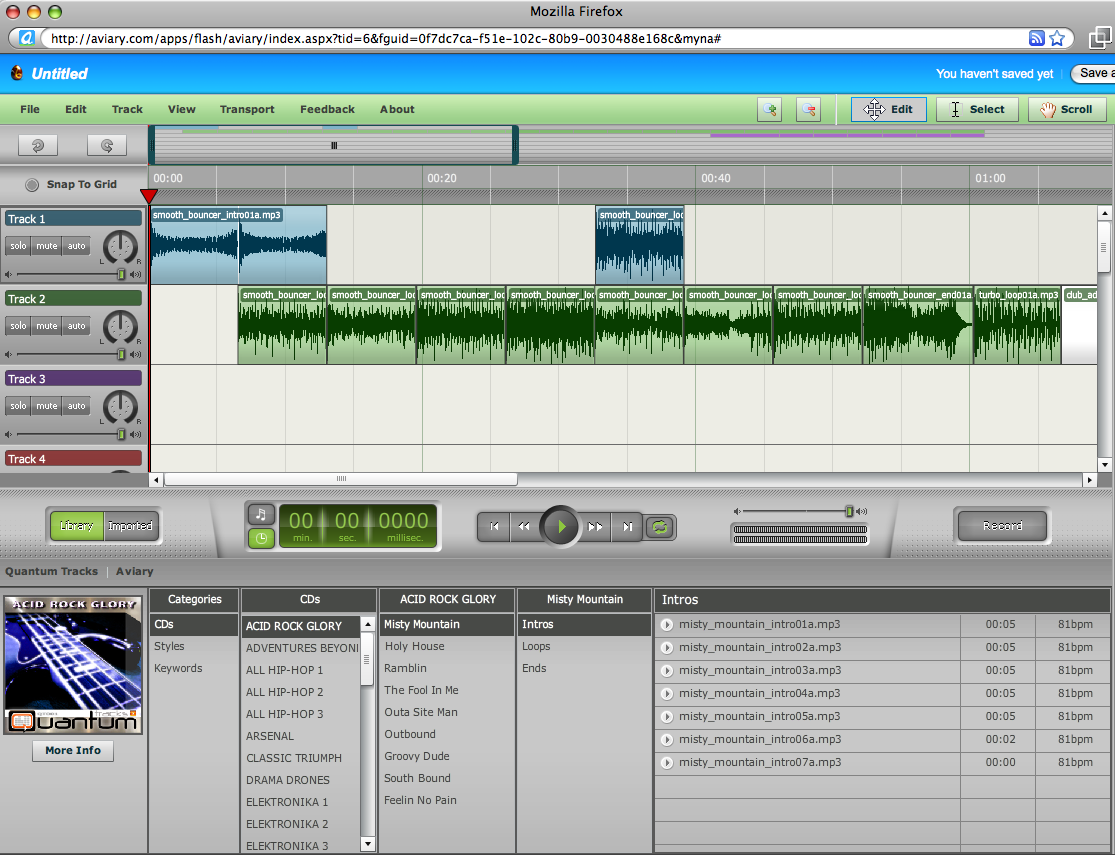
AVIARY http://aviary.com is a set of media recording and editing tools that work inside of your web browser - a powerful 'cloud computing' tool. It's key features include:

  • Photo Editor (including masks)

  • Vector image editor - c.f. Freehand/Illustrator

  • Screen Capture

  • Multitrack Audio Editor and Recorder - e.g. Garageband, a nicer interface than Audacity!


Video Intro to Aviary:


Video Intro to the Aviary Audio recorder/editor (Myna)

  1. Visual Waveform editor

  2. Automation

  3. Effects

  4. Import/Export

  5. Share sessions


Example Myna Session:


denis.egg by denistuning on Aviarydenis.egg by denistuning on Aviary

Screenshot:

AviaryMynaEditor.png

Monday, September 14, 2009

Learning Space Design


Students preferred learning space ezample!

Saturday, September 12, 2009

Livestream - create your own free online TV station

Free online Video streaming tools:

  1. Livestream

  2. uStream


Collate and stream your YouTube videos, live webcam, and even smartphone camera (ustream only), creating a virtual TV station! Great for presenting/sharing compilations of presentations, student projects, events, etc...

http://www.livestream.com


uStream


Thursday, September 10, 2009

Apple releases iPod updates, iTunes9 & iPhone 3.1 OS

Today Apple released updated versions of their iPod line - the biggest update being for the iPod Nano which now sports some great media capturing tools:

iPod Nano


  • Camera for video (& images?), sync to YouTube via iPhoto

  • Built-in microphone and speaker for audio recording

  • Pedometer - good for exercise!

  • Nike+ built-in

  • FM Radio


iPodNano2009.jpg


So Apple now have a great media capturing device at an affordable price point for students. Like a 'Flip' video camera built into an iPod! Camera records at close to DVD quality (640x480, 30fps, H264). Audio includes AIFF, WAV, AAC, MP3 formats. So a potential staged implementation of WMDs for students could look like:
  • students buy iPod Nano in Y1,
  • iPhone in Y2,
  • Mac 'Tablet' or MacBook in Y3...


Pricing:
iPod nano
8GB NZ$259
16GB NZ$318

inc GST

iTunes9


New features include ability to remotely organise iPhone screens - i.e. organise apps.

iTunesManageiPhoneHomescreen.jpg


Also Apple gave statistics on games for the iPhone - way ahead of PSP & Wii!!!

iPhoneGames.jpg

Tuesday, September 08, 2009

Intentional Communities Of Practice

Here's an overview of the development (2006 to 2009) of an intentional Communities OF Practice model for Academic Professional Development. This grew out of the Dummies2Delight group started in 2006, and has grown into a model for creating and supporting collaborative teaching and learning projects with a technology steward (CTLI/TPA) lecturers and their students.

  1. Dummies2Delight Overview 2007: http://docs.google.com/View?id=dchr4rgg_46dw5q29gj

  2. Community Of Practice invite (2007 original): http://docs.google.com/View?id=dchr4rgg_47g7cxz2f6

  3. First collaborative COP report 2007:
    From Dummies2Delight

  4. Moving Mobile Mainstream (Via Communities Of Practice) 2007: http://docs.google.com/View?id=dchr4rgg_9d4c5z4sw

  5. CTLI Minisymposium 2007 - COP "Show & Tell". http://www.youtube.com/watch?v=90ORtMXVW2M

  6. Just What Is A Community Of Practice? (2008): http://docs.google.com/View?id=dchr4rgg_1ft6g3fhp

  7. Community Of Practice Outline 2008: http://docs.google.com/View?id=dchr4rgg_6dfm64xdd

  8. Example COP Invite (SPASA 2008): http://docs.google.com/View?id=dchr4rgg_2qhmt3kg6

  9. TPA Minisymposium 2009: Example COP feedback.
    1. http://www.youtube.com/watch?v=j9rK9VKR11Y
    2. http://www.youtube.com/watch?v=9HV7Yh3JLss
    3. http://www.youtube.com/watch?v=6krZJJ12GCQ


Video Overview (With focus on mobile web 2.0 projects development):


For more background info on COPs, see Wenger's introduction website and one-page COP setup guide:

Tuesday, August 25, 2009

Nokia 3G 'Booklet' (netbook)

Just announced - Nokia will be producing a 10" netbook, it's main differences from others will be the quality of the build (one pice machined aluminium - cf Apple MacBooks), 12 hour battery life!, built-in GPS, and integration of OVI and maps software. Unfortunately it will run Windows OS (probably Windows 7). So - now a phone manufacturer makes PCs, and a Computer manufacturer (Apple) makes smartphones!



Wednesday, August 12, 2009

Picasaweb Slideshows


Picasaweb: Interactive Slideshows!


  1. Use your GMail addrerss to create a free picasaweb account

  2. Upload Photos to an 'album' on your Picasaweb (use 'Pixelpipe', Shozu or email upload from the XM5800)

  3. Annotate your uploaded photos

  4. Geotagged photos will be added to Google Maps - or you can add your pphotos to Google maps manually in your Picasasweb album.

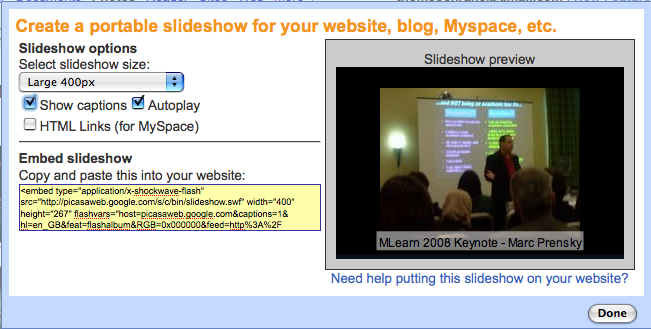
  5. Embed your album as an interactive slideshow in VOX

  6. Comment on each others picasaweb photos!

PicasawebEmbedOptions.png


PicasawebEmbedCode.png


Tuesday, August 11, 2009

Mlearning introduction to Building technology students 11/08/2009


A quick demo of videoblogging using the Nokia N95 smartphone. Students signing up for the first mlearning project with building technology!

Wednesday, August 05, 2009

Architecture MLearning Rollout 2009


Second year Bachelor of Architecture students and staff receiving Dellmin9 netbooks and Nokia xpressmusic 5800 smartphones for mlearning project 2009.

Tuesday, July 28, 2009

Film & TV mlearning rollout

You can edit movies directly on the XM5800 smartphone - it includes a basic movie editor similar to iMovie on it - you can cut, paste clips together, add effects and soundtrack, and text/titles directly on the phone, then upload the edited movie to your chosen online site.
To access the movie editor on the XM5800, go to the gallery application, choose a movie, then choose 'options', 'edit' then choose editing options.

e.g. http://www.youtube.com/watch?v=Ct5iBSz8ai4
"Film and TV third year students receive netbooks and smartphones for mlearning project at Unitec. Video and images recorded on an N97, video edited on N97, uploaded directly from N97 via Shareonline/Pixelpipe"

http://pixelpipe.com/item/a3b706e5-f335-4199-accf-4268b774b2a3


Monday, July 27, 2009

Monday, July 20, 2009

Configuring 141 netbooks for mlearning projects

Here's a quick video (recorded and uploaded to YouTube directly from an iPhone 3GS) showing Thom, Vickel & Hung in the process of configuring 141 netbooks for mlearning projects at Unitec last week! The FIRST one was fun! - the next 140 weren't quite so fun ;-)

Saturday, July 04, 2009

Video recorded entirely on iPhone 3GS

from http://mashable.com/2009/07/02/technologic-overkill/


class="enclosure enclosure-center enclosure-auto embed-enclosure"
style="text-align: center;">

style="width: 400px;"
>


Tuesday, June 30, 2009

EDULearn Conference09 Virtual Presentation

A short video introduction to our collaborative research paper presentation at the EDULearn09 Conference in Barcelona, 6-8 July 2009.

By Thom Cochrane, Unitec, New Zealand. Paper: "Mobilising Learning: Mobile Web2.0 Scenarios in Tertiary Education." Wiki Link for more info: http://ctliwiki.unitec.ac.nz/index.php/MobilisingLearning


Cochrane, T., Bateman, R., Cliffin, P., Gardner, J., Henderson, I., & Holloway, S. (2009, 6th to 8th July). Mobilizing Learning: Mobile Web 2.0 Scenarios in Tertiary Education. Paper presented at the EDULEARN09 the International Conference on Education and New Learning Technologies, Barcelona, Spain.

MobilisingLearningWikiQR.png

Designing SMS apps for mobile Africa

An interesting article from the Google Mobile development team!:


Designing SMS apps for mobile Africa: "As is well known, our mission is to organize the world's information and make it universally accessible and useful. We aim to do this through technology, and in Africa, that means developing tools for the mobile phone. Africa has the world’s highest mobile growth rate. Mobile phone penetration is six times Internet penetration -- one third of the population owns a mobile phone and many more have access to one. Most of these devices only have voice and SMS capabilities, which is why we have chosen to focus our initial mobile efforts on SMS.

Today, we are releasing Google SMS in Uganda. Google SMS is a suite of mobile applications which provides access, via SMS, to information on a diverse number of topics including health and agriculture tips, news, local weather, sports, and more.

The suite also includes Google Trader, a marketplace application that helps buyers and sellers find each other. Users can find, 'sell' or 'buy' any type of product or service, from used cars and mobile phones to crops, livestock and jobs. Google Trader has been designed to help make markets more transparent. Many people in Africa lack access to information and markets beyond their immediate business and social networks. Google Trader allows sellers to post items for sale via SMS, and for buyers to search for such items.


Google SMS Tips is an SMS-based query-and-answer service. After you text a free-form query, Google algorithms restructure the query to identify keywords, search a database to identify relevant answers, and return the most relevant answer. SMS is a very limited medium: each SMS can be no longer than 160 characters, and, unlike the web, allows for one result to be returned in response to a query. Short or ambiguous queries are particularly challenging. For example: we've received queries as brief as 'hiv'. What exactly is someone asking for: symptoms? Causes? Prevention? Treatment? We not only have to discern intent in order to identify a relevant answer, but we also have to convey information back to the user within the confines of SMS. The challenge is further complicated by the fact that people must pay for each individual SMS message.

These are the sorts of technical challenges that have surfaced in developing SMS Tips, so please don't view it as a finished product. We need to greatly improve search quality and add to the content that we have in the Health and Ag focus areas. Now that Google SMS is live, we're working on improving search quality and the breadth, and depth, of content. As for Tips, we will work to add more focus areas.

Clearly, we're just beginning; there's still much to be done. If you're curious about what Google is doing in Africa, visit the Google Africa Blog. And here's a video about the broader effort initiated by the Grameen Foundation to introduce mobile applications to under-served communities.


"


(Via Google Mobile Blog.)