Here's my list of my top twenty apps (All on the iTunes Store for download - some free, some not):
1. Mail
Great for checking mail anywhere, anytime. Awesome preview of attachments (no saving :-( ). My favourite way to blog.
2. Safari
The best Mobile Web experience around!
3. NetNewsWire
For keeping up with all my RSS Feeds.
4. Fring
Instant Messaging extraordinaire!, also includes Skype, Gmail notifier, and Twitter posts.
5. Twitterriffic
Finally Twitter makes sense ;-)
Includes GPS and Photo microblogging to Twitter.
6. YouTube App
Search, bookmark, email, blob-out to YouTube Videos on the awesomely viewable screen!
7. Google App
Shortcut to Googles Mobile Web Services - formatted for iPhone.
8. Shozu
A social Media-blogging hub!
9. Google Earth
Cool maps! Zoom in on your house!
10. FourTrack
Ditch the cassette recorder - record your musical masterpieces in multitrack using FourTrack.
11. Caravan
Easy Mac & PC file-sharing with iPhone.
12. Bible reader
Carry a searchable Bible everywhere!
13. Path Tracker
Track your movements over Google Maps and savethe path - could be a great car-rally or treasure hunt tool!
14. Mobile Fotos
Flickr on your iPhone.
15. Band
Create some musical inspiration - WOW!
16. Comic Touch
Annotate your pics.
17. DecibelMeter
How load is that music???
18. iProRecorder
Record a voice note or audio PODCast.
19. Voice4Fun
Edit your audio recordings on the iPhone
20. Speedtest
Test how fast your internet connection is - is Telecom/Vodafone ripping you off???
Monday, December 22, 2008


Sunday, December 21, 2008
Beached Whale
Check out this video on YouTube:
http://www.youtube.com/watch?v=ZdVHZwI8pcA
Sent from my iPhone
Sunday, December 14, 2008

Thursday, December 11, 2008
iPhone Music Video
Rap Music Video recorded entirely on iPhone using Jailbroken iPhone and Cycorda app.
I used Cycorder to shoot everything. This app rocks, but you can only use it if your phone is jailbroken, so go out and jailbreak your iPhone - you will thank me later. After Effects was used to edit the video because Final Cut didn’t like the resolution and frame rate that came out of Cycorder. I particularly like the look of the footage when it gets all warpy because the sensor can’t keep up with the motion. It kind of has this retro/film/stopmotion feel.
See the authors Blog
YouTube video HERE
I used Cycorder to shoot everything. This app rocks, but you can only use it if your phone is jailbroken, so go out and jailbreak your iPhone - you will thank me later. After Effects was used to edit the video because Final Cut didn’t like the resolution and frame rate that came out of Cycorder. I particularly like the look of the footage when it gets all warpy because the sensor can’t keep up with the motion. It kind of has this retro/film/stopmotion feel.
See the authors Blog
YouTube video HERE
Wednesday, December 03, 2008
MLearning the new (fun) frontier
http://wimba.netspot.com.au:80/wimba/player?action=display&rid=1-1226988860644&mid=87-1228211062495
Podcast interview after my presentation at Ascilite2008.
Sent from my iPhone
Nokia N97 Demo - the great Fondle Video
Check out this video on YouTube:
http://www.youtube.com/watch?v=AD-elt8MN3I
The N97 looks great, but it looks like the user interface is not as
slick or intuitive as the iPhone, and appears to require multiple
touches to achieve actions? Will have to try one out - can't wait
until June July09 :-)
This of course gives Apple time to introduce the iPhone v3 before
then! Here's hoping! Competition is great!!!
Sent from my iPhone
Nokia N97 Demo
Check out this video on YouTube:
http://www.youtube.com/watch?v=2O2Li74EYew
Sent from my iPhone


Tuesday, December 02, 2008
mLearning - Using mobile technologies to develop new ways of teaching and learning
mLearning - Using mobile technologies to develop new ways of teaching and learning
University of Woolongong mlearning project, a series of 6 week long mlearning trials using Palm Treo680 smartphones and iPods, funded by Australian govt.Critique: short-term projects with unoptimum choices of technology!Publishing affordances of mlearning - but will results be coloured by the projects limitations?!See Ascilite2008 papers of the various case studies. Herrington et al. The study was supported by a team of 12 staff - wow! 12 people doing what I have been doing all on my own at Unitec!
Networked Student
Check out this video on YouTube:
http://www.youtube.com/watch?v=XwM4ieFOotA
Sent from my iPhone
Monday, December 01, 2008
Auzzie PrePaid Mobile Broadband

'3' have a PrePaid mobile broadband data 'account' option - I'm using this while in Melbourne for ASCILITE2008!
Cost is $10 for the SIM card, $29/month for 2GB data
This is pretty good value & no long term contract required!
AND you can use your own 3G Modem - I'm using a NZ Vodafone 3G Expresscard Modem with the '3" SIM. Only downside is some of the activation process requires the '3' modem software, and it's a pain having to remove cookies to get beyond the 'activation' page each connection :-(

Friday, November 21, 2008
Subway Mobile!

The ubiquitous nature of mobile connectivity is illustrated by the availability of a Subway Express downloadable application for mobile phones for ordering subway sammies from anywhere anytime - as well as "learner generated contexts" we also now have "consumer generated eating" ;-)
Cost = 20c per order - as the application forwards your order as a txt message.
Download yours HERE

Blackberry Storm 9500
The Blackberry Storm 9500 touch-screen smartphone has been getting some good reviews, including from Mac users! e.g:
MacWorld review
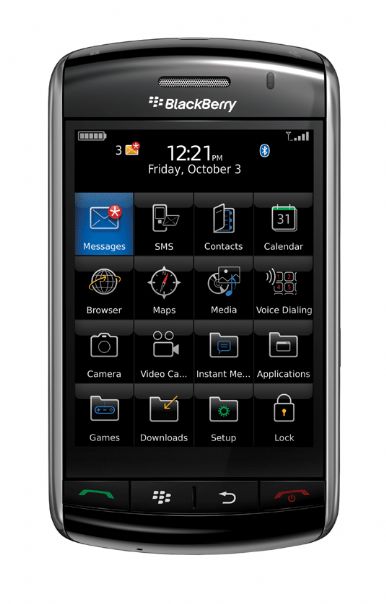
The Storm has a couple of features that give it an edge over the iPhone in specifications,
However, it BIG limitation is the lack of WiFi!!! WiFi has become a BASIC feature of smartphones, and is critical in educational settings as WiFi provides cost-effective (FREE) access to the Internet on campus for students, whereas the 3G only Storm will cost $$$ for EVERYTHING the students do! :-(
Blackberry are still in a business users mode!
MacWorld review
The Storm has a couple of features that give it an edge over the iPhone in specifications,
- Cut and Paste
- Higher resolution camera: 3.2MP
- Video recording
However, it BIG limitation is the lack of WiFi!!! WiFi has become a BASIC feature of smartphones, and is critical in educational settings as WiFi provides cost-effective (FREE) access to the Internet on campus for students, whereas the 3G only Storm will cost $$$ for EVERYTHING the students do! :-(
Blackberry are still in a business users mode!
Monday, November 17, 2008
WOA - electronic musicians - SLOrk and "iBand"!!!
Check out this amazing 'band' - all using iPhone/iPod touch music applications to form a band! They have some great videos and audio samples on their website - awesome!
iPhone Drumming demo:
iBand performance:
Currently highlighted on Apples website is SLOrk - the Stanford Laptop Orchestra!
http://www.apple.com/pro/profiles/slork/

http://slork.stanford.edu/
iBand
iPhone Drumming demo:
iBand performance:
SLOrk
Currently highlighted on Apples website is SLOrk - the Stanford Laptop Orchestra!
http://www.apple.com/pro/profiles/slork/
http://slork.stanford.edu/
Thursday, November 13, 2008
Mourning the End of the Mobile Projects
Students mourn the return of their smartphones at the end of mobile learning projects at Unitec 2008!
Mourning the N95
“This is what I am left with!
It cannot…
Take Photos
Email
Check the wind
Make videos
Be my friend
Tell me where Ennismore Rd is
Or how to get there
Take more photos
Do other internet things
Film this
Be my calendar,
Reminder,
Or memory
(I have a bad memory)
The screen on this is tiny
There is no -
Sports tracker
Bouncy ball
Keyboard
VOX
Location Tag
YouTube
Plus all the rest
I miss my N95
Everything else
Doesn’t
Cut
It”
“This is what I am left with!
It cannot…
Take Photos
Check the wind
Make videos
Be my friend
Tell me where Ennismore Rd is
Or how to get there
Take more photos
Do other internet things
Film this
Be my calendar,
Reminder,
Or memory
(I have a bad memory)
The screen on this is tiny
There is no -
Sports tracker
Bouncy ball
Keyboard
VOX
Location Tag
YouTube
Plus all the rest
I miss my N95
Everything else
Doesn’t
Cut
It”
Mobile Learning Reflections
A series of student reflections on some of the Mobile Learning Trials at Unitec 2008.
Diploma Contemporary Music - iPod/iPhones
Bachelor Product Design (Year2) N95
Bachelor Product Design (Year1) iPhones
Diploma Landscape Design - Sonyericsson P1i
Thursday, November 06, 2008
Txttools
Txttools is an SMS (short message service, or text messaging) solution for organizations, including education. There are two main ways to use txttools:

Features:

Below is the Web Management interface for Txttools:

Moodle Txttools plugins screenshots:


- Web interface at http://www.txttools.co.uk
- LMS plugins for Blackboard or Moodle
Features:
- Create groups
- Integration with user profiles in Moodle or Blackboard - i.e. txttools plugin recognises groups, and mobile phone numbers in user profiles.
- Database of sent and received txt messages
- Statistics monitoring - showing sent/received status of messages for each user.
- Automated actions via administrator defined keywords
- Automatic registration of users by txting a keyword to a dedicated txttools number
- Cost confidence - cost = annual license fee, not per message.
Below is the Web Management interface for Txttools:
Moodle Txttools plugins screenshots:
Wednesday, October 29, 2008
Fring on iPhone
Another free IM client for the iPhone/iPod touch. I've used Fring for a while on a range of Symbian based phones (they also have a Java version) - it's unique feature is the support for Skype over Wifi on the iPhone/iPod touch (Fring supports Skype over 3G in its other versions in addition to WiFi). Fring can be a bit flakey - being a bit of a memory hog, and requires a good signal to logon. However I prefer Fring's interface to that of Palringo or AIM. Previously I have used IM+ on UIQ, which I thought the interface was really nice, however IM+ seems to have logon issues with MSN servers now :-(
class="enclosure enclosure-center enclosure-extra-large photo-enclosure"
style="text-align: center;">
style="padding: 9px; border: 1px solid; width: px; margin: 10px auto;"
>

class="enclosure enclosure-center enclosure-extra-large photo-enclosure"
style="text-align: center;">
style="padding: 9px; border: 1px solid; width: px; margin: 10px auto;"
>
Thursday, October 23, 2008

Subscribe to:
Posts (Atom)


 Posts
Posts

