Tuesday, June 30, 2009

Designing SMS apps for mobile Africa

An interesting article from the Google Mobile development team!:


Designing SMS apps for mobile Africa: "As is well known, our mission is to organize the world's information and make it universally accessible and useful. We aim to do this through technology, and in Africa, that means developing tools for the mobile phone. Africa has the world’s highest mobile growth rate. Mobile phone penetration is six times Internet penetration -- one third of the population owns a mobile phone and many more have access to one. Most of these devices only have voice and SMS capabilities, which is why we have chosen to focus our initial mobile efforts on SMS.

Today, we are releasing Google SMS in Uganda. Google SMS is a suite of mobile applications which provides access, via SMS, to information on a diverse number of topics including health and agriculture tips, news, local weather, sports, and more.

The suite also includes Google Trader, a marketplace application that helps buyers and sellers find each other. Users can find, 'sell' or 'buy' any type of product or service, from used cars and mobile phones to crops, livestock and jobs. Google Trader has been designed to help make markets more transparent. Many people in Africa lack access to information and markets beyond their immediate business and social networks. Google Trader allows sellers to post items for sale via SMS, and for buyers to search for such items.


Google SMS Tips is an SMS-based query-and-answer service. After you text a free-form query, Google algorithms restructure the query to identify keywords, search a database to identify relevant answers, and return the most relevant answer. SMS is a very limited medium: each SMS can be no longer than 160 characters, and, unlike the web, allows for one result to be returned in response to a query. Short or ambiguous queries are particularly challenging. For example: we've received queries as brief as 'hiv'. What exactly is someone asking for: symptoms? Causes? Prevention? Treatment? We not only have to discern intent in order to identify a relevant answer, but we also have to convey information back to the user within the confines of SMS. The challenge is further complicated by the fact that people must pay for each individual SMS message.

These are the sorts of technical challenges that have surfaced in developing SMS Tips, so please don't view it as a finished product. We need to greatly improve search quality and add to the content that we have in the Health and Ag focus areas. Now that Google SMS is live, we're working on improving search quality and the breadth, and depth, of content. As for Tips, we will work to add more focus areas.

Clearly, we're just beginning; there's still much to be done. If you're curious about what Google is doing in Africa, visit the Google Africa Blog. And here's a video about the broader effort initiated by the Grameen Foundation to introduce mobile applications to under-served communities.


"


(Via Google Mobile Blog.)

Friday, June 19, 2009

2009 MLearning Projects Overview

The projects are guided and supported by weekly “technology sessions” (Communities of Practice, or COP) facilitated by a ‘technology steward’ (Wenger et al., 2005) investigating the potential of mobile web 2.0 technologies for integration within each course. The COPs are a collaborative partnership between the researcher (as the 'technology steward'), the course lecturers, and their students. The mlearning projects prior to 2009 had comprised small groups of students from select courses that volunteered to participate in the projects, while the breadth of funding secured for the 2009 projects enabled all students in each course to voluntarily participate if they chose. All participants (both lecturers and students) are provided with either (and in some cases both) an appropriate smartphone or 3G enabled netbook for the duration of their courses in 2009.


The following sections outline three illustrative mobile web 2.0 case studies:

  1. A collaborative sustainable house design project between a third year Product Design course and a second year Landscape Design course. The Ning (http://www.ning.com) social network is used to facilitate collaboration between the two different courses (http://designprojects.ning.com).
    * Product Design students using Nokia N95 smartphones and folding Bluetooth keyboards to capture and share design ideas and reflections on design via the use of an online blog/eportfolio.
    * Landscape Design students using 3G enabled netbooks to facilitate the development of a collaborative design process via Ning forums, and online media sharing sites such as Flickr (http://www.flickr.com) and YouTube (http://www.youtube.com).
  2. Contemporary Music students using iPhones as tools to record and share environmental sounds from a variety of off-campus contexts, as well as creating online profiles on Vox (http://www.vox.com ) and MySpace (http://www.myspace.com), evaluating the use of new technologies for music generation, sharing, marketing, and distribution.


Read more and view videos etc... on our WIKI page:

http://ctliwiki.unitec.ac.nz/index.php/MobilisingLearning

Thursday, June 11, 2009

Student Technology Usage

Here's a snap poll of a class of students, quickly capturing what technology they bring to class. How are we as educators harnessing the potential of this technology that our students have ion their pockets?


Video recorded on an N95 smartphone via QIK live video streaming to the Internet:

http://www.qik.com/video/1838357

QIK (and the N95) also geotags video streams as below:

View Larger Map

Wednesday, June 10, 2009

Tag Maps for TPA eTeam (Wordle)

Below are a couple of 'Wordle' pictures overviewing some of the areas of speciality of the Te Puno Ako 'eTeam':

eTeamTPA.jpg


TCdeliciousWordle.jpg

Tuesday, June 02, 2009

How One Teacher Uses Twitter in the Classroom

Here's an example of using Twitter in education:

How One Teacher Uses Twitter in the Classroom: "

Teachers are always trying to combat student apathy and University of Texas at Dallas History Professor, Monica Rankin, has found an interesting way to do it using Twitter in the classroom.


(Via Read/WriteWeb.)

Friday, May 22, 2009

Landscape Design Netbook rollout

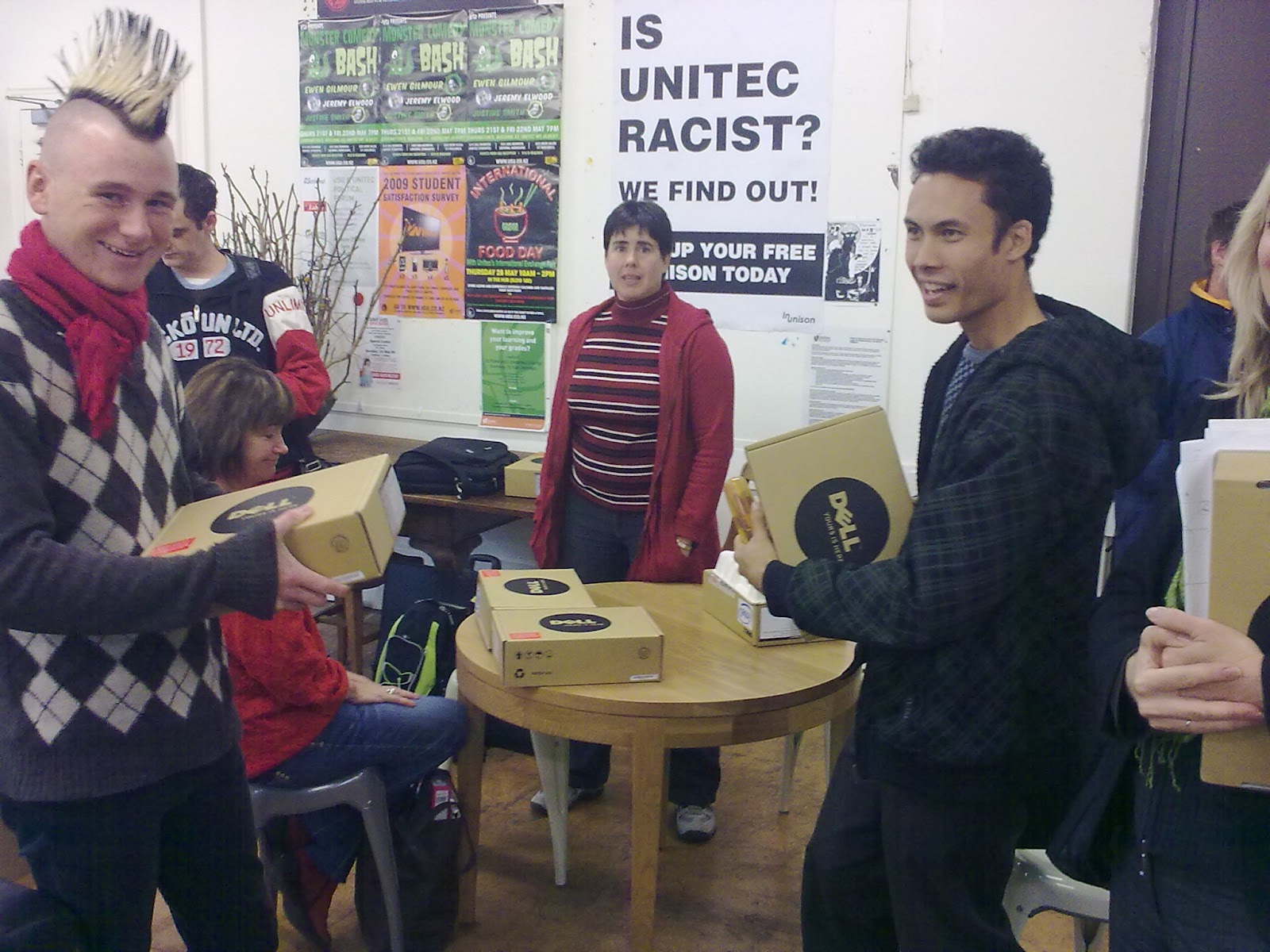
Today we started the netbook project with the second year Diploma of Landscape Design students and staff. All students and staff were issued a Dell Mini9 netbook for use in their course for the rest of the year. the netbooks will be used as 'windows' into the online web 2.0 world - students will be blogging, uploading and sharing photos and VODCasts of their designs and learning experiences.

LandscapeNetbooks1.jpg


LandscapeNetbooks2.jpg


This project follows on from a collaborative web 2.0 project between Landscape Design and third year Product Design students on the SHac09 sustainable house competition, where NING was used as a collaborative online space.

See Penny's overview of the project:

http://pennycliffin.vox.com/library/post/minisymposium.html

Lecturer Mobile VODCasts

Our Community Of Practice with Performing Arts Tutors is focusing on the educational potential of mobile web 2.0 technologies. In particular the Tutors have appropriated VODCasting, using QIK live video streaming from a smartphone to record video reflections and notes to their students.

Here's an example:


Performing Arts COP participants:

Wednesday, May 13, 2009

Student Netbook Feedback

We've just started the first netbook roll-out project with the first year Product Design students, and we're getting great feedback from them already - embedding some video feedback below (recorded using their netbook webcams and uploaded to their blogs):


BDesY1netbooks.jpg


Post by Email

Wordpress finally brings email blogging to facilitate simple mobile blogging - a feature that every other blogging patform has had for years!
There are limitations: - image attachments will be viewable in email posts, however audio and video attachments will only work if the video and audio extensions are purchased off Wordpress :-(
Hey Wordpress - this is free on every other blog system!

Click the following linkfor more details and a video overview:

Post by Email: "Post by Email"


Wednesday, May 06, 2009

Ready steady cook


Sushi making competition - yum!

Posted via Pixelpipe.

Student NetBook Project

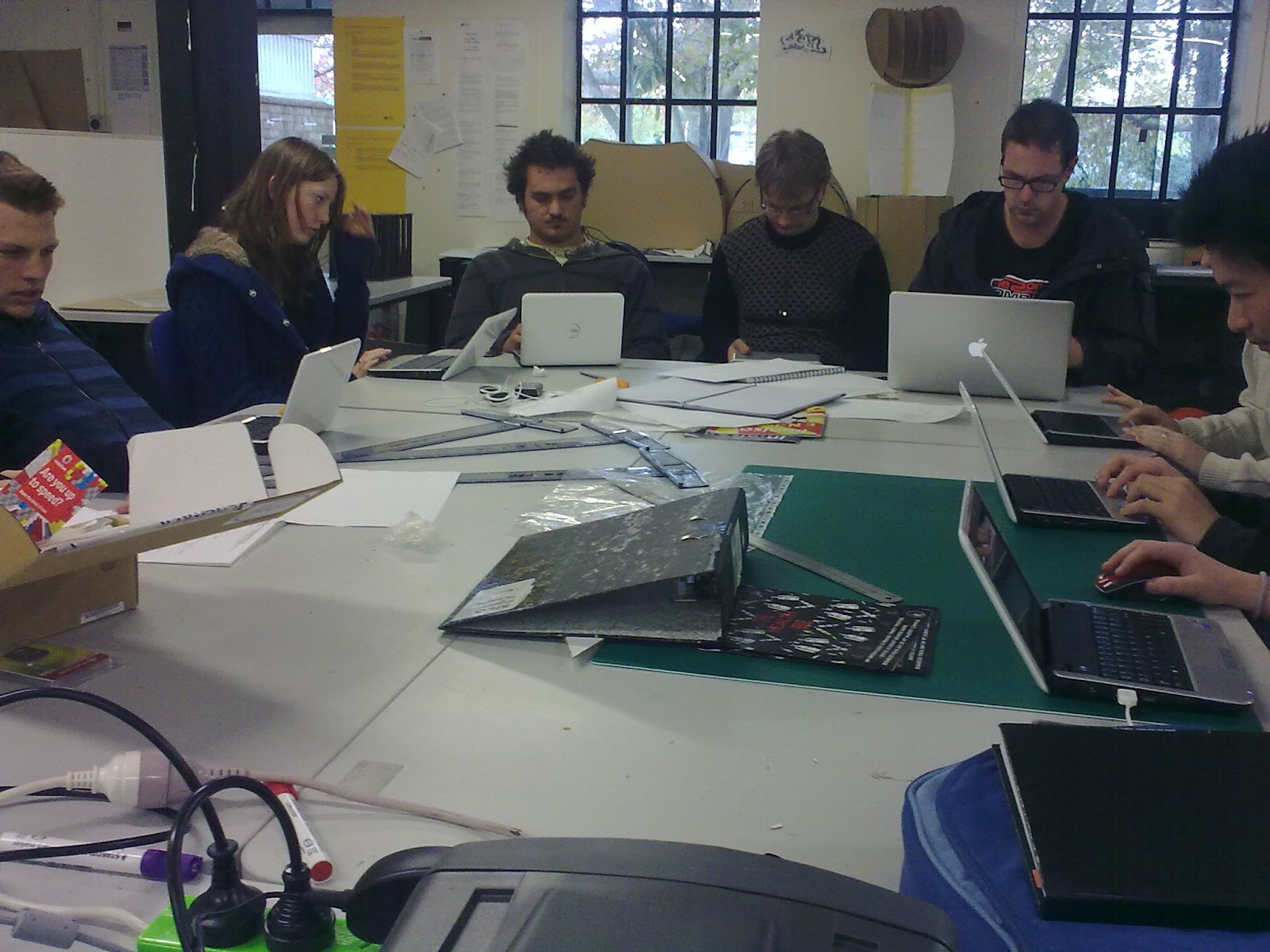
Today we started the first of several netbook implementation projects (as part of a wider mlearning project) at Unitec. The first year Product Design class all received Dell Mini9 netbooks to use for their course for the rest of the year.
A Moodle course is being used to guide the educational use of the netbooks, as we explore their use within a web2, social constructivist paradigm, to enhance their learning experience, and bridge the 'digital divide'!

BDesY1netbooks5.jpg


BDesY1netbooks.jpg


BDesY1netbooks2.jpg

Saturday, May 02, 2009

Cellphone Network Development in NZ

A nice NZ Hearld artivle outlining the history of the NZ Cellphone networks, on the eve of Telecoms new network launch - and Vodafones attempt to block it.


http://www.nzherald.co.nz/business/news/article.cfm?c_id=3&objectid=10569922


CellphoneEvolution-NZHerald020509.jpg

Thursday, April 23, 2009

My Favourite Nokia Xpressmusic 5800 Applications

While there's still quite a few apps still to be ported to the S60 v5 for the Xpressmusic 5800, here's a list of my favourite applications for the Nokia Xpressmusic 5800 smartphone, plus links for downloading these (where needed).


  • Messaging - the built-in app for Email and Txt, and my preferred way of mobile blogging.

  • Share Online3 - built-in app accessible via the 'media bar' shortcut 'button' top of the screen.
    I've setup direct links to OVI, Pixelpipe, Flickr, Vox.

  • Google Mobile app - http://m.google.com linking to the Google mobile suite (Calendar, Reader, YouTube, Search...

  • Fring - For instant messaging,
    Twitter,
    GMail notification,
    Skype

  • QIK - for video streaming

  • Quickoffice - for reading Word & Excell docs

  • Google Maps - with fantastic street view, and Google Latitude for following friends via GPS!

  • Screensnap - for taking screenshots of the phone

  • Kaywa Reader - for 2D Mobile Codes

  • Nokia Wireless Keyboard app = for linking to bluetooth keyboards

  • Goo Sync - for synchronising Google Calendar with the 5800 built-in calendar app

  • PhotoFlow - for viewing pics

  • The camera - with firmware upgrade v2 GPS tagging is automatic and built-in

  • Nokia EasyMeet - widget and web site for collaborating between mobile devices and computer users

Lecturer feedback on smartphone

Txt messages illustrating enthusiastic response from lecturer to the Nokia Xpressmusic 5800 smartphone!

LoveThisPhone.jpg

Wednesday, April 15, 2009

Vodafone 3G Broadband Pre Pay

Vodafone NZ have released a 3G broadband data pre pay option, beyond the $1 per day 10MB cap. The new options are:

  • $10 for 100MB over a month

  • $40 for 512MB over a month


http://www.vodafone.co.nz/shop/plansMobileInternet.jsp?plantype=data&billingMethod=prepay&menuKey=mnit600004

3Gprepay.png

Nokia Easy Meet - Beta Labs

Check out this video on YouTube:

http://www.youtube.com/watch?v=B9V91mHhplo


Sent from my iPhone

Nokia Easy Meet | Nokia Beta Labs

Mobile collaboration tool looks very promising!

http://betalabs.nokia.com/betas/view/nokia-easy-meet


Sent from my iPhone

Tuesday, March 31, 2009

Skype on the iPhone

Great news for iPhone users - official Skype app now available free on
the iTunes app store.

Thursday, March 26, 2009

mICTe Conference Presentation

IntegratingMobileWeb2qr.png


QR Code link to Wiki page "Integrating Mobile Web2"

Wednesday, March 18, 2009

iPhone OS3 Features announced

Apple iPhone OS3 features: http://tinyurl.com/detdar


iPhone OS3 overview http://tinyurl.com/coydrt


Overview of updates in slide below (From GSMArena, and Engadget)
iPhoneOS3features.jpg


Apple Presentation http://events.apple.com.edgesuite.net/0903lajkszg/event/index.html

http://www.apple.com/iphone/preview-iphone-os/

Great list of new features, BUT still no video recording or Flash support!!! BOO!

Wednesday, March 04, 2009

In-Flight Mobile

Singapore Air now provide in-flight facilities for accessing your mobile content and devices on their in-seat AV centres - even in economy class! On certain flights there is even a special iPod/iPhone remote cable available - very nice. Also powerpoints in-seat for laptops, but the AV Centre allows editing of Office documents from a Flash-drive directly using the text-entry on the console controller!

PICS BELOW:

From Barcelona 24/02/09


From Barcelona 24/02/09


From Barcelona 24/02/09


From Barcelona 24/02/09


From Barcelona 24/02/09


Saturday, February 28, 2009

IADIS 2009 Conference presentation

From Barcelona 24/02/09


Lots of questions - good discussion generated, time for coffee now!


From Barcelona 24/02/09

Thursday, February 26, 2009

IADIS Mobile Learning Presentation

IADIS Mobile Learning Conference presentation notes now on wiki: http://ctliwiki.unitec.ac.nz/index.php/MobilePedagogy2


Feel free to discuss IADIS presentation here: http://ctliwiki.unitec.ac.nz/index.php/Talk:MobilePedagogy2

MySpace Mobile

MySpace are actively persuing mobile users by creating very mobile friendly applications for checking and updating your MySpace profiles etc...

http://www.symbian-freak.com/news/009/02/myspace_launches_new_mobile_website_for_s60_devices.htm

Wednesday, February 25, 2009

Photos from Barcelona


class="enclosure enclosure-center enclosure-auto embed-enclosure"
style="text-align: center;">

style="width: 194px;"
>


Monday, February 02, 2009

Smartphone Marketshare 08


Table of smartphone marketshare 2008 from ABI Research

Report LINK


Legend: SS = Samsung, Sony E = Sony ericsson, Mot = Motorola

Wikipedia has different numbers for the last quarter of 2008 - showing the iPhone in second place!
http://en.wikipedia.org/wiki/Smartphone


Market_share_of_mobile_os_s_2008


A third report below for Q3 2008

http://www.canalys.com/pr/2008/r2008112.htm

"The introduction of the iPhone 3G in July and Apple’s expansion
into many more countries helped propel the vendor to second place
globally, taking it above RIM in the quarter and resulting in higher
shipments than for all the Microsoft-based smart phones combined."


SmartphoneMarketshareQ3_08

CTLI Learning Technologies Slideshare

Created by Hazel Owen, CTLI.

Tuesday, January 27, 2009

New Media Consortium Emerging Technologies 2009 Report

The 2009 Report identifies Mobile Devices as an emerging technology with time-to-adoption of one to two years.

■ Mobiles. Already considered as another component of the network on many campuses, mobiles continue to evolve rapidly. New interfaces, the ability to run third-party applications, and location-awareness have all come to the mobile device in the past year, making it an ever more versatile tool that can be easily adapted to a host of tasks for learning, productivity, and social networking. For many users, broadband mobile devices like the iPhone have already begun to assume many tasks that were once the exclusive province of portable computers.

Identified emerging technologies in education include (in order ofadoption timeframe)

  1. Mobiles

  2. Cloud Computing

  3. Geo-Everything

  4. The Personal Web

  5. Semantic-Aware Applications

  6. Smart Objects


http://www.nmc.org/news/nmc/2009-horizon-report-released

http://www.nmc.org/pdf/2009-Horizon-Report.pdf

Monday, January 26, 2009

Smartphones & the future of Music Sales

NZHerald article on future delivery of music – via smartphones!

Schweizer, K. (2009, January 24). Musicians turn to tech-savvy audience: Smartphones and the internet prove popular with both artisits and fans. Weekend Herald, p. C5.

"Most music will eventually be accessed over smartphones such as Apple's iPhone and Research In Motion's BlackBerry, said Terry McBride, who manages Sarah McLachlan and Avril Lavigne."

"The smartphone is changing the music industry because of its platform and I predict most consumption of music will be through a smartphone in the future," McBride said in Cannes.

Read full article HERE:
http://www.nzherald.co.nz/business/news/article.cfm?c_id=3&objectid=10553302&pnum=0

Thursday, January 22, 2009

Some Mobile Learning Options:


  1. Eee PC 901,
  2. Nokia N95 with bluetooth folding keyboard,
  3. Nokia Xpressmedia 5800,
  4. Nokia E90,
  5. 3M MPro110 pico projector
  6. Apple iPhone (not shown)
  7. Palm Pre (not yet released)
  8. Nokia N97 (not yet released)


You may notice an absence of windows mobile or Blackberry devices - this is by choice ;-) . I'm interested in devices that students will want to own and use, rather than 'business' focused devices.

Wednesday, January 21, 2009

Nokia XM5800 & MPro110

Here's the Nokia Xpressmusic smartphone connected to the 3M MPro110 pico projector!
Needs quite a dark environment to be effective.

Ning iPhone 1

Ning mobile version optimized for iPhone

Tuesday, January 20, 2009

Nokia Share Online services


Screenshot of Noka XpressMusic 5800 Share Online destinations

Posted via Pixelpipe.

Sunday, January 18, 2009

Why You Have To Jailbreak the iPhone - ReadWriteWeb

http://www.readwriteweb.com/archives/why_you_have_to_jailbreak_the_iphone.php


Sent from my iPhone

A way forward for learning

Here's a thought-provoking post!

A way forward for learning: "

Teemu Arina has a link on his blog to an article he wrote for his company blog on ‘Horizontal technologies for learning.’ The following definitional distinction between LMS and PLE is huge. It is a key insight into why education has barely moved into the connected age and why social technologies are, as he says, ‘a way forward’:


Horizontal integration is a way forward. In the eLearning sector many vendors have created eLearning solutions primarily for educational institutions. These technologies are supposedly designed for learning but that is not true. These technologies are institution-centric and vertical by nature. The concept of Learning Management System (LMS) was wrongly named. Better fit for a name would be Teaching Management System or Institution Control System.


No student would use the current so-called learning environments during their worktime or freetime. In 2006 I was at EC-TEL where Scott Wilson asked the audience full of educational technology specialists, ‘how many of you use a LMS for your personal learning?’. Surprise. No hands.


Social technologies are different. Blogs and wikis are already being implemented by learners themselves. Call them Personal Learning Environments (PLE) if you want but the key issue here is that they are based on user-centric design.


(Via Smart Mobs.)

Saturday, January 17, 2009

Pixelpipe mobile test

uploading from Pixelpipe on iPone

Posted via Pixelpipe.

PixelPipe

PixelPipe is a media uploading service for mobile and desktop that supports over 60 web2 services. It appears very similar to Shozu. It works via email or "Share Online" (Nokia NSeries only), iPhone App, or Android App for mobile uploads (No Java or WM App). This is a PixelPipe Uploader upload - testing Mobile upload soon.

Posted via Pixelpipe.

Thursday, January 15, 2009

Picasa for Mac

Google have finally released a Mac version of their photo management/uploading/editing application Picasa. It's been a long-time favourite of mine on the PC, but I've usually defaulted to iPhonto on the Mac with Picasa and Flickr scripts for web uploading of photos or the Picasa web uploader application. While it's great to see it available for Mac, I'm not sure (yet) that it brings anything significant to the party - apart from better Blogger and Picasaweb albums integration. Perhaps if you are usually a PC user Picasa would feel like 'home'?

Download link HERE

PicasaMac.png

Monday, December 22, 2008

Top 20 iPod Touch & iPhone apps

Here's my list of my top twenty apps (All on the iTunes Store for download - some free, some not):

1. Mail

Great for checking mail anywhere, anytime. Awesome preview of attachments (no saving :-( ). My favourite way to blog.


2. Safari

The best Mobile Web experience around!


3. NetNewsWire

For keeping up with all my RSS Feeds.


4. Fring

Instant Messaging extraordinaire!, also includes Skype, Gmail notifier, and Twitter posts.


5. Twitterriffic

Finally Twitter makes sense ;-)
Includes GPS and Photo microblogging to Twitter.


6. YouTube App

Search, bookmark, email, blob-out to YouTube Videos on the awesomely viewable screen!


7. Google App

Shortcut to Googles Mobile Web Services - formatted for iPhone.


8. Shozu

A social Media-blogging hub!


9. Google Earth

Cool maps! Zoom in on your house!


10. FourTrack

Ditch the cassette recorder - record your musical masterpieces in multitrack using FourTrack.


11. Caravan

Easy Mac & PC file-sharing with iPhone.


12. Bible reader

Carry a searchable Bible everywhere!


13. Path Tracker

Track your movements over Google Maps and savethe path - could be a great car-rally or treasure hunt tool!


14. Mobile Fotos

Flickr on your iPhone.


15. Band

Create some musical inspiration - WOW!


16. Comic Touch

Annotate your pics.


17. DecibelMeter

How load is that music???


18. iProRecorder

Record a voice note or audio PODCast.


19. Voice4Fun

Edit your audio recordings on the iPhone


20. Speedtest

Test how fast your internet connection is - is Telecom/Vodafone ripping you off???

Sunday, December 21, 2008

Beached Whale

Check out this video on YouTube:

http://www.youtube.com/watch?v=ZdVHZwI8pcA


Sent from my iPhone

Sunday, December 14, 2008

Billy Joel Concert

Stage - waiting to start!

Thursday, December 11, 2008

iPhone Music Video

Rap Music Video recorded entirely on iPhone using Jailbroken iPhone and Cycorda app.

I used Cycorder to shoot everything. This app rocks, but you can only use it if your phone is jailbroken, so go out and jailbreak your iPhone - you will thank me later. After Effects was used to edit the video because Final Cut didn’t like the resolution and frame rate that came out of Cycorder. I particularly like the look of the footage when it gets all warpy because the sensor can’t keep up with the motion. It kind of has this retro/film/stopmotion feel.

See the authors Blog

YouTube video HERE

Wednesday, December 03, 2008

MLearning the new (fun) frontier

http://wimba.netspot.com.au:80/wimba/player?action=display&rid=1-1226988860644&mid=87-1228211062495

Podcast interview after my presentation at Ascilite2008.

Sent from my iPhone

Nokia N97 Demo - the great Fondle Video

Check out this video on YouTube:

http://www.youtube.com/watch?v=AD-elt8MN3I

The N97 looks great, but it looks like the user interface is not as
slick or intuitive as the iPhone, and appears to require multiple
touches to achieve actions? Will have to try one out - can't wait
until June July09 :-)
This of course gives Apple time to introduce the iPhone v3 before
then! Here's hoping! Competition is great!!!

Sent from my iPhone

Nokia N97 Demo

Check out this video on YouTube:

http://www.youtube.com/watch?v=2O2Li74EYew


Sent from my iPhone

Nokia N97 - Nseries with touch and QWERTY

http://www.allaboutsymbian.com/news/item/8590_Nokia_N97-Nseries_with_QWERTY_.php


Sent from my iPhone

IMG_0057.JPG
IMG_0056.JPG
IMG_0055.JPG
IMG_0054.JPG

Tuesday, December 02, 2008

mLearning - Using mobile technologies to develop new ways of teaching and learning

mLearning - Using mobile technologies to develop new ways of teaching and learning

http://mlearning.uow.edu.au/


Sent from my iPhone

University of Woolongong mlearning project, a series of 6 week long mlearning trials using Palm Treo680 smartphones and iPods, funded by Australian govt.

Critique: short-term projects with unoptimum choices of technology!

Publishing affordances of mlearning - but will results be coloured by the projects limitations?!

See Ascilite2008 papers of the various case studies. Herrington et al. The study was supported by a team of 12 staff - wow! 12 people doing what I have been doing all on my own at Unitec!

Networked Student

Check out this video on YouTube:

http://www.youtube.com/watch?v=XwM4ieFOotA


Sent from my iPhone

Monday, December 01, 2008

Auzzie PrePaid Mobile Broadband

3mobileBroadbandPrePay.jpg


'3' have a PrePaid mobile broadband data 'account' option - I'm using this while in Melbourne for ASCILITE2008!

Cost is $10 for the SIM card, $29/month for 2GB data

This is pretty good value & no long term contract required!

AND you can use your own 3G Modem - I'm using a NZ Vodafone 3G Expresscard Modem with the '3" SIM. Only downside is some of the activation process requires the '3' modem software, and it's a pain having to remove cookies to get beyond the 'activation' page each connection :-(

Ascilite2008 Conference