Halfway through the otago halfway - a great relaxing 4 day ride with good food & quaint accomodation!
Tuesday, March 25, 2008
Cycling the otago railtrail


Tuesday, March 18, 2008
N80 Launch with BDesign (Product) students!
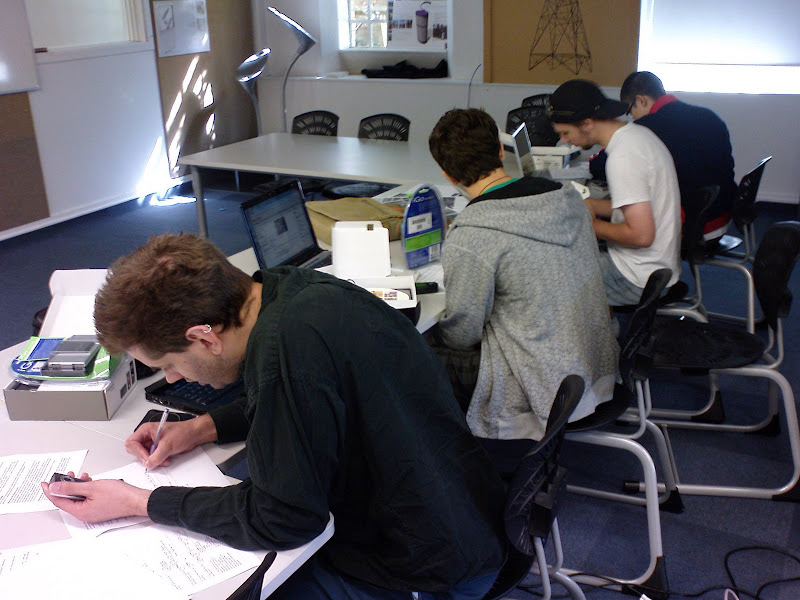
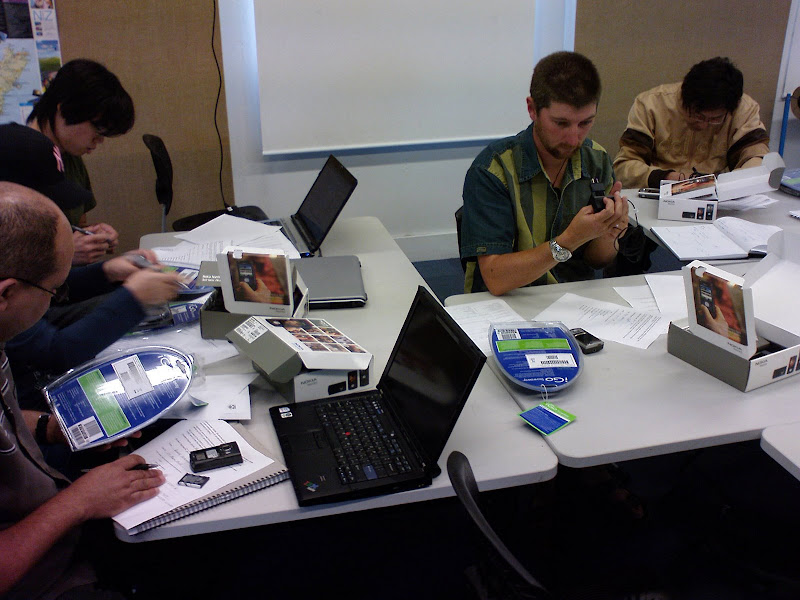
Yesterday we handed out the Nokia N80's and got students underway with WiFi accecss while we're waiting on Vodafone to sign students up on voice and data plans (C'mon Vosafone - get your act together!!!).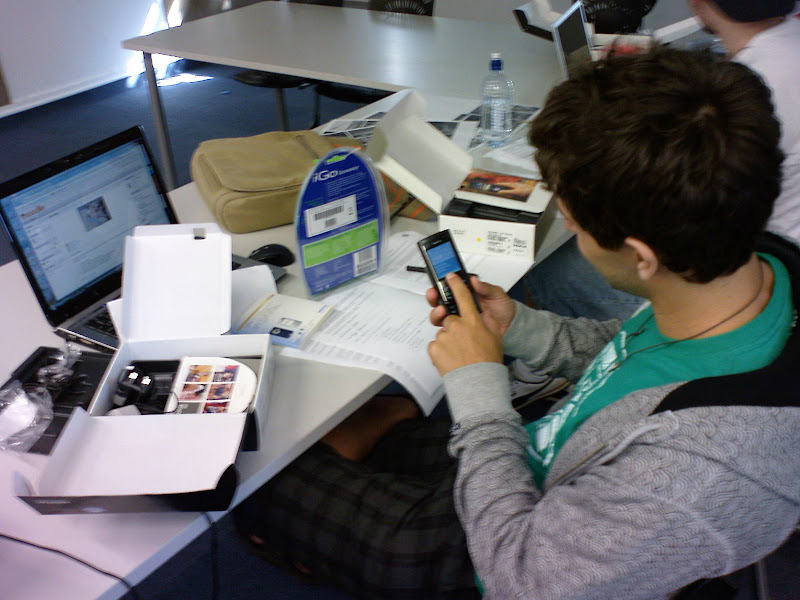
Tuesday, March 11, 2008
MobBlogs
This post from Roger's Vox blog today: (Bachelor Product Design Tutor)
PS - it was a fun session - a bunch of enthusiastic students and two enthusiastic Tutors as well!
DesignProjects3 11/03/08 8:59 PM DesignProjects3 mobile blogging ctli"
PS - it was a fun session - a bunch of enthusiastic students and two enthusiastic Tutors as well!
MobBlogs: "MobBlogs
Blogging Session
A huge thanks to Thom Cochran from the Unitec CTLI (Centre for Teaching and Learning Innovation) who came into studio this morning and ran a session on blogging and mobile blogging.
The staff along with Thom are researching into the effectiveness of mobile blogging and how it might contribute to or enhance teaching and learning. The Bachelor of Product Design is based upon the 'classic' studio teaching model and through our research project we aim to disrupt this model and seek a new model(s) for the programme. Thom is running another research project with the Landscape Architecture Department and both these projects will be contributing to his PhD studies.
Today we gave out Nokia N80's to a 8 selected students. The N80's come with folding bluetooth keyboards to make copy writing that much easier.
All students in the 3rd year are required to blog as part of their final year projects but these 8 will be taking part in the mobile blogging research project. Each client has been encouraged to take part in the blogging process and to interact with the students whenever possible.

DesignProjects3 11/03/08 8:59 PM DesignProjects3 mobile blogging ctli"
(Via DesignProjects3.)
Friday, March 07, 2008
iPod Touch Trial begins!
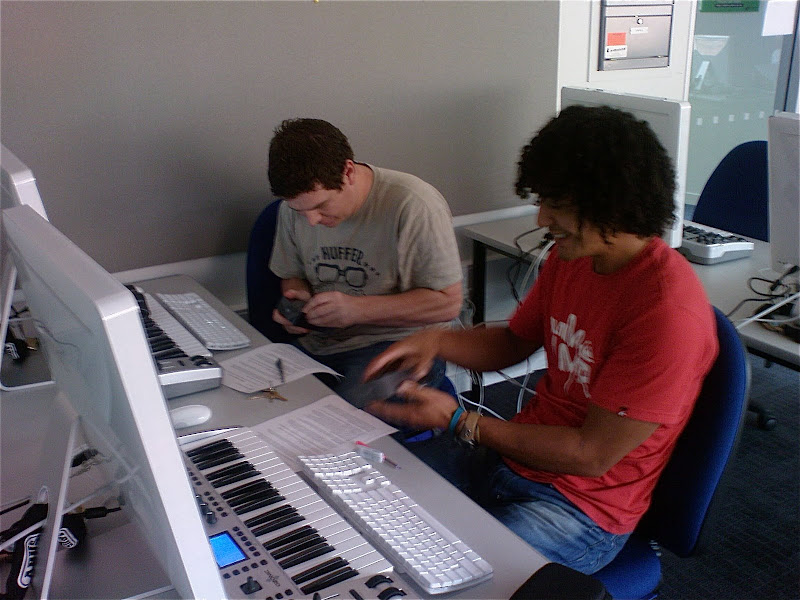
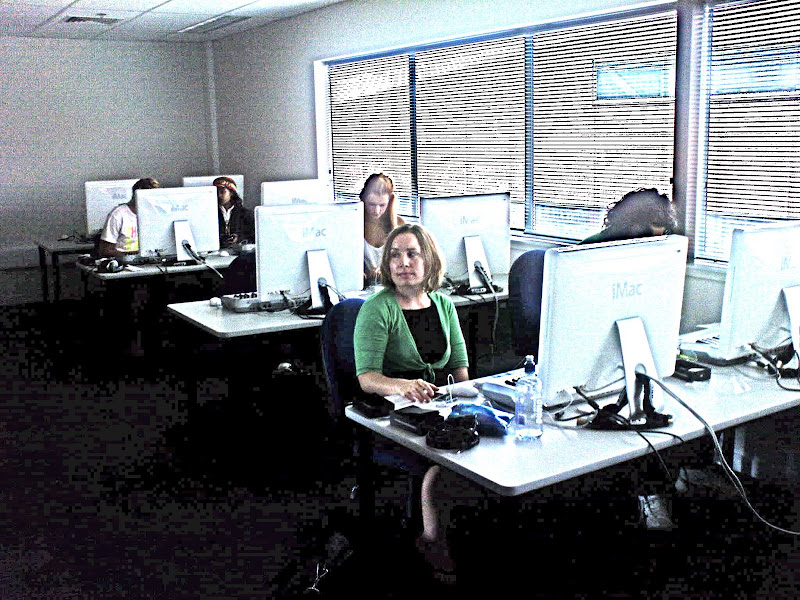
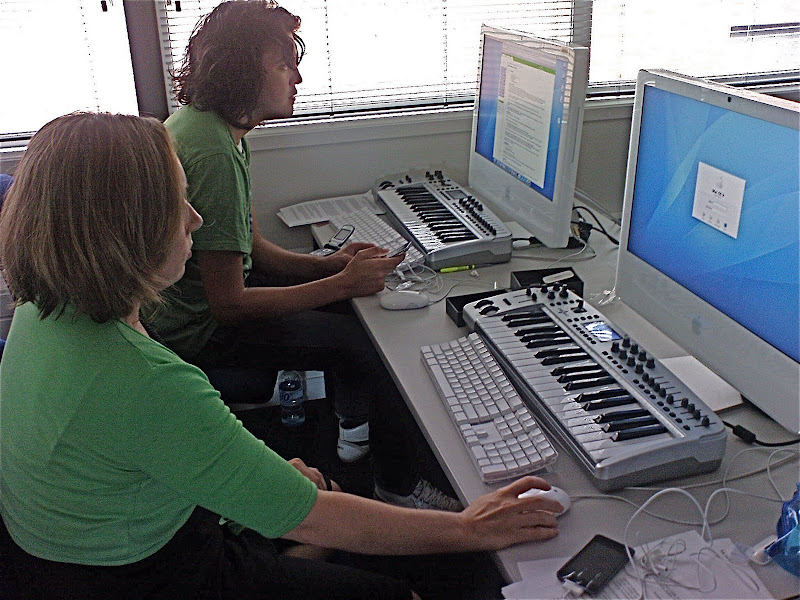
Today we started an iPod Touch mobile trial with Diploma of Contemporary Music students! Great fun - everyone got their iPod Touch configured and setup on the WiFi network.

Participants:
12 students – students volunteer to participate using provided iPod Touch.
Course Tutors
Technology Steward (Thom Cochrane – CTLI)
The main focus of this project is on the support and enhancement of face to face teaching and learning by using mobile wireless devices (iPod Touch) as a means to leverage the potential of current and emerging collaborative and reflective e-learning tools (e.g. blogs, wikis, RSS, instant messaging, podcasting, social book marking, etc…). These are often called “social software” tools. The iPod’s wireless connectivity and data gathering abilities (e.g. photoblogging, video recording, voice recording, and text input) allow for bridging the on and off campus learning contexts – facilitating “real world learning”.
The learning outcomes for students are
Students and teaching staff will be provided with an iPod Touch (16GB) for the duration of the trial (2008). Internet connectivity will also be available via Unitec WiFi network while on campus. This provides faster, free web access while on campus.
The project will be guided and supported by weekly “technology sessions” facilitated by Thom Cochrane (CTLI).
The core activity of the project is the creation and maintenance of a reflective Blog as part of a course group project. However the iPod can be used to enhance almost any aspect of the course:
The project will use the iPod Touch and PCs (Macs) for the following activities:

Participants:
12 students – students volunteer to participate using provided iPod Touch.
Course Tutors
Technology Steward (Thom Cochrane – CTLI)
The main focus of this project is on the support and enhancement of face to face teaching and learning by using mobile wireless devices (iPod Touch) as a means to leverage the potential of current and emerging collaborative and reflective e-learning tools (e.g. blogs, wikis, RSS, instant messaging, podcasting, social book marking, etc…). These are often called “social software” tools. The iPod’s wireless connectivity and data gathering abilities (e.g. photoblogging, video recording, voice recording, and text input) allow for bridging the on and off campus learning contexts – facilitating “real world learning”.
The learning outcomes for students are
- Developing critical reflective skills
- Facilitating group communication
- Developing an online eportfolio
- Developing a potentially world-wide peer support and critique network
- Learning how to maximise technology to enhance the learning environment across multiple contexts
Students and teaching staff will be provided with an iPod Touch (16GB) for the duration of the trial (2008). Internet connectivity will also be available via Unitec WiFi network while on campus. This provides faster, free web access while on campus.
The project will be guided and supported by weekly “technology sessions” facilitated by Thom Cochrane (CTLI).
The core activity of the project is the creation and maintenance of a reflective Blog as part of a course group project. However the iPod can be used to enhance almost any aspect of the course:
The project will use the iPod Touch and PCs (Macs) for the following activities:
- A reflective Blog (Vox.com)
- An eportfolio (Vox.com)
- Email (GMail)
- RSS (Newsgator.com)
- Shared Calendars (Google Calenders)
- Image Blogging (Flickr)
- Video Blogging (YouTube)
- Podcasting
- Instant Messaging and Skype
- Shared bookmarks (Delicious)
- Accessing the Course Management System (Blackboard)
- Document reading (Word, Excel, Powerpoint, PDF using QuickOffice and Google Docs)
Monday, March 03, 2008
iPhone/iPod Touch Web Apps
A brief list of some favourite iPhone/iPod Touch Web Apps (While waiting on the flood of new iPhone apps as a result of the upcoming iPhone SDK release ;-)
- * Flickr Poto Sharing m.flickr.com/h
- * YouTube m.youtube.com/
- * Wordpress Blog m.wordpress.com/
- * Vox Blog www.vox.com/
- * Google Reader www.google.com/reader/m/view/
- * Google Calendar www.google.com/calendar/render
- * Google Docs docs.google.com/
- * GMail mail.google.com/
- * Pownce m.pownce.com/
- * Picasaweb photo sharing picasaweb.google.com/home
- * Google Maps maps.google.com/
- * MobileWebDocs www.mobilewebdocs.com/
- * iPocket Bible www.ipocketbible.com/go/login.asp
- * Netvibes Homepage iphone.netvibes.com/
- * SnapMyLife www.snapmylife.com/
- * Skype for iPhone s4iphone.com/index_iphone.jsp
- * AIM Instant Messaging x.aim.com/ty/#_startPage
- * JWire - find free WiFi hotspots iphone.jiwire.com/
- * Stopwatch www.kudit.com/desktop/kudit.php?shortname=stopwatch&success=false
- * Bloglines RSS Reader www.bloglines.com/mobile
- * Zoho MS Office mini.zoho.com/iZoho.jsp
- * Mundu Instant Messaging iphone.mundu.com/
- * Newsgator RSS Reader m.newsgator.com/iphone.aspx
- * iGoogle Homepage www.google.com/ig/i
- * Mobile Delicious Social Bookmarking mobilicio.us/
Wednesday, February 20, 2008

Thursday, February 07, 2008
Moodle Case Study
An interesting case study of students perception on the use of Moodle and its web2 tools integration: from Educause
"Moodle, an open source course management software, is not only a tool for communication and reflection but also a virtual learning object. Explore how students in an information-literacy course respond to, comprehend, and use a variety of web 2.0 technologies in a single online environment."
Read the PDF report HERE.
"Moodle, an open source course management software, is not only a tool for communication and reflection but also a virtual learning object. Explore how students in an information-literacy course respond to, comprehend, and use a variety of web 2.0 technologies in a single online environment."
Read the PDF report HERE.
Wednesday, January 30, 2008
Students use of IT
An interesting survey summary from Educause ECAR, outlining 10 key findings of the 2007 ECAR study of Students and Information Technology usage.
"What information technologies are used by undergraduates? How does IT contribute to their academic experiences and learning? What has changed since 2005? ECAR presents 10 key findings from the fourth annual survey of undergraduates, with responses from 27,846 students at 103 higher education institutions."
ECAR conclude with two key action focii:
Read more below:
Caruso, J. B., & Salaway, G. (2007). Highlights of the 2007 ecar study of students and information technology. ECAR Symposium 2007 Retrieved 21 January, 2008, from http://connect.educause.edu/Library/ECAR/Highlightsofthe2007ECARSt/45912
"What information technologies are used by undergraduates? How does IT contribute to their academic experiences and learning? What has changed since 2005? ECAR presents 10 key findings from the fourth annual survey of undergraduates, with responses from 27,846 students at 103 higher education institutions."
- One size does not fit all
- Social Uses of IT- Important and Personal
- CMS Usage is Up
- IT is All About Convenience
- IT as a Utility
- Students’ Assess Their IT Skills
- Curriculum Matters
- IT in Instruction –Striking the Balance
- Mobility –A Steady Increase
- Learning –It’s All about Instructors
ECAR conclude with two key action focii:
- Action Focus: IT Services
- • Move toward 24 x 7 availability
–Networks
–Email
–CMS and other services - • Strengthen the Help Desk
- • Continue wireless initiatives
- • Watch usage trends for handheld devices
- • Move toward 24 x 7 availability
- Action Focus: IT in Courses
- • Know your students’ IT profile
–What technology do they own?
–What are their IT skills? - • Assess use of IT in courses
–Is there a balance between IT and instructor
interaction?
–How can you leverage the curriculum?
–Are faculty trained in the IT they need?
–Do students have the skills they need?
- • Know your students’ IT profile
Read more below:
Caruso, J. B., & Salaway, G. (2007). Highlights of the 2007 ecar study of students and information technology. ECAR Symposium 2007 Retrieved 21 January, 2008, from http://connect.educause.edu/Library/ECAR/Highlightsofthe2007ECARSt/45912
Friday, January 25, 2008
YouTube Mobile Updated
The YouTube mobile website version (http://m.youtube.com)has been updated with more features and a better interface, so now it supports almost any mobile phone with a data connection (Best viewed over a WiFi network!). There is also a YouTube Java appplication (currently for a small number of 3G phones - includes the Nokia N95) that can be downloaded from http://m.youtube.com/app. The Java app gives a similar experience to YouTube on the iPod touch or iPhone. Videos can now be uploaded directly from compatible mobiles to your YouTube account, or emailed to a special MMS number associated with your YouTube account.
Read more here:
http://www.youtube.com/mobile
Read more here:
http://www.youtube.com/mobile
Wednesday, January 16, 2008
iPod Touch Blog test2

iPod touch - however when choosing a photo from the iPods library
there is now an "email photo" option!
Blog test.
Blog test.
I've updated my iPod touch with the Mail & Notes apps from todays
MacWorld announced 1.1.3 software update! These two apps should
significantly increase the usefulness of the Touch as a moblogging
device. I think this was the most interesting announcement of MW2008.
The Macbook AIR is nice but still too large & expensive to be a
contender for mobile education. The Apple TV has some nice updates.
Disapointingly no word on third party iPhone apps or 3G iPhone. I guess
we'll be waiting till Feb for those.
I've updated my iPod touch with the Mail & Notes apps from todays
MacWorld announced 1.1.3 software update! These two apps should
significantly increase the usefulness of the Touch as a moblogging
device. I think this was the most interesting announcement of MW2008.
The Macbook AIR is nice but still too large & expensive to be a
contender for mobile education. The Apple TV has some nice updates.
Disapointingly no word on third party iPhone apps or 3G iPhone. I guess
we'll be waiting till Feb for those.
Sent from my iPod
Thursday, January 10, 2008
Newsgator RSS reader clients now FREE!

Newsgators Mac & Windows and mobile device RSS readers are now all FREE!
I've been using the free version of NetNewsWire for years (lite) - but now the full version is free! I've also been using Newsgator Go (Java application) on my cellphone for RSS synchronization - this is now free as well. Newsgator is a great RSS solution that works anyway you want to (Desktop client, web interface, mobile - all synchronizing seemlessly). They must be facing tough competition from the likes of Bloglines and Google Reader to dump their client fees!
Isn't competition great!
Thursday, January 03, 2008
Nokia E90
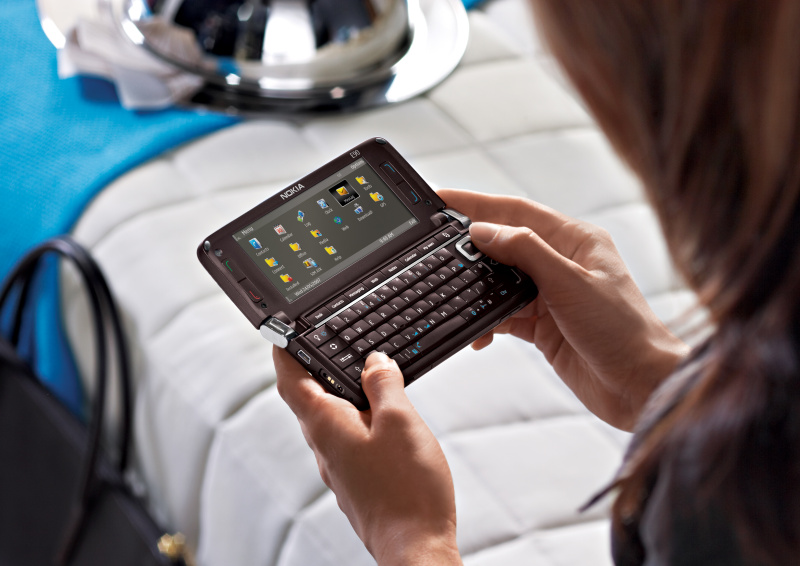
The Nokia E90 looks interesting as an all-in-one (UMPC) device. Rather expensive ($1600NZ), and heavy (232gm) but you don't need a Bluetooth keyboard or external screen (builtin 800x365 resolution!).
http://www.nokia.co.nz/link?cid=PLAIN_TEXT_742130
http://www.nokia.co.nz/link?cid=PLAIN_TEXT_742130
PicoProjector - mobile video projector coming of age!
Microvision are about to demo their tiny Pico Projector at CES.
The tiny battery powered projector is designed to work with mobile devices that have video out - e.g. N95, new PSP, iPod etc...

Microvision are also working on an embedded version - built into a cellphone!
Very cool.

The tiny battery powered projector is designed to work with mobile devices that have video out - e.g. N95, new PSP, iPod etc...
Microvision are also working on an embedded version - built into a cellphone!
Very cool.
Fring Updated
Fring has added AIM & Yahoo talk to its list of supported IM services. A great free application for virtually all mobile phones, supporting:
Fring describes itself as a VOIP application that provides:
fring is compatible with Symbian 8, 9.1, 9.2, Windows Mobile 5 & 6 and UIQ handsets.
- Skype
- MSN
- AIM
- ICQ
- Yahoo Talk
- SIP
- Google Talk
Fring describes itself as a VOIP application that provides:
- Presence
- Free Calls
- Live Chat
fring is compatible with Symbian 8, 9.1, 9.2, Windows Mobile 5 & 6 and UIQ handsets.
Thursday, December 20, 2007
JISC Online Conference proceedings
The JISC online conference proceedings on institutional innovation are now available online: HERE.
Check out the summary of Giedre & my presentation: Cochrane, T., & Kligyte, G. (2007, 11-14 June). Dummies2delight: Using communities of practice to develop educational technology literacy in tertiary academics. Paper presented at the JISC online conference: Innovating eLearning, JISC online conference. Pages 36-38.
We discussed Communities of Practice for professional development, and the use of web2 technologies. JISCebookone2007.pdf
Check out the summary of Giedre & my presentation: Cochrane, T., & Kligyte, G. (2007, 11-14 June). Dummies2delight: Using communities of practice to develop educational technology literacy in tertiary academics. Paper presented at the JISC online conference: Innovating eLearning, JISC online conference. Pages 36-38.
We discussed Communities of Practice for professional development, and the use of web2 technologies. JISCebookone2007.pdf
Friday, December 14, 2007
TruTap
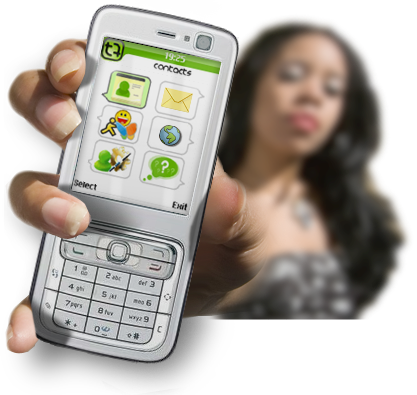
http://trutap.com is a mobile Java client for social networking. It includes:
It's interface is somewhat clunky - no where near as smooth & mature as Shozu. Worth keeping an eye on.
- Instant Messaging - MSN, AOL, Yahoo, ICQ
- Messaging (cf email)
- Blog Posting - Blogger, Flickr, etc...
It's interface is somewhat clunky - no where near as smooth & mature as Shozu. Worth keeping an eye on.
Friday, December 07, 2007
7 things you should know about Skype: Educause
Another short paper in the Educause 7 Things series:
Abstract:
Skype is a voice over Internet protocol (VoIP) application that lets users make free phone calls between Skype-equipped computers and inexpensive calls between Skype computers and landline or cell phones. Skype functions on a P2P model rather than as a centralized application, and it offers features such as voicemail, call forwarding, conference calling, and video chat. In most circumstances, Skype provides access to voice and video communication for a fraction of what other options cost. It allows more frequent contact between colleagues, collaborators, and friends and permits connections with those not likely to be in conventional phone systems.
Download PDF.
Abstract:
Skype is a voice over Internet protocol (VoIP) application that lets users make free phone calls between Skype-equipped computers and inexpensive calls between Skype computers and landline or cell phones. Skype functions on a P2P model rather than as a centralized application, and it offers features such as voicemail, call forwarding, conference calling, and video chat. In most circumstances, Skype provides access to voice and video communication for a fraction of what other options cost. It allows more frequent contact between colleagues, collaborators, and friends and permits connections with those not likely to be in conventional phone systems.
Download PDF.
Social Network Sites: History & Scholarship
An interesting journal article:
Abstract
"Social network sites (SNSs) are increasingly attracting the attention of academic and industry researchers intrigued by their affordances and reach. This special theme section of the Journal of Computer-Mediated Communication brings together scholarship on these emergent phenomena. In this introductory article, we describe features of SNSs and propose a comprehensive definition. We then present one perspective on the history of such sites, discussing key changes and developments. After briefly summarizing existing scholarship concerning SNSs, we discuss the articles in this special section and conclude with considerations for future research."
The paper includes a timeline of Social Network Sites (SNS's)
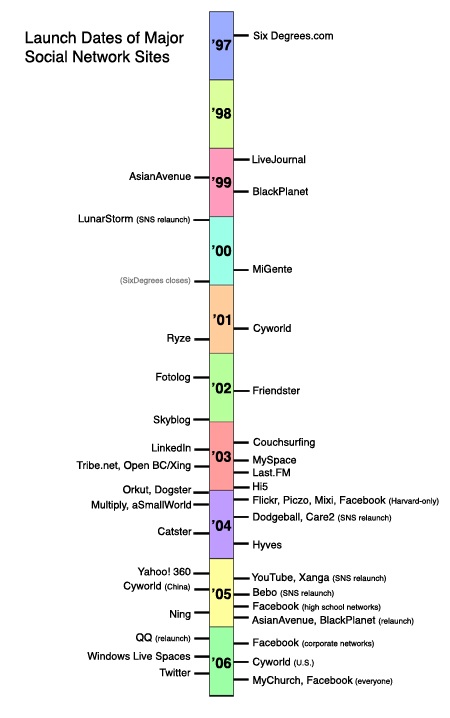
Abstract
"Social network sites (SNSs) are increasingly attracting the attention of academic and industry researchers intrigued by their affordances and reach. This special theme section of the Journal of Computer-Mediated Communication brings together scholarship on these emergent phenomena. In this introductory article, we describe features of SNSs and propose a comprehensive definition. We then present one perspective on the history of such sites, discussing key changes and developments. After briefly summarizing existing scholarship concerning SNSs, we discuss the articles in this special section and conclude with considerations for future research."
The paper includes a timeline of Social Network Sites (SNS's)
Wednesday, December 05, 2007
iSkoot
iSkoot is a free Skype client for a wide range of mobile phones!

iSkoot puts Skype on
your mobile phone.
Now offered on the P1i from Sony Ericsson!
FEATURES AND BENEFITS
1. Easy installation:**
Option 1: iSkoot can send you a link to our free software in an email or SMS text message–just request it when you register!
Option 2: Download to your PC and transfer to your handset using its Bluetooth® or infrared port or your USB cable.
2. Simple, intuitive user interface
• Click to call a Skype contact
• Click to chat with a Skype contact
• Make inexpensive international calls using SkypeOut
• Receive Skype calls on your mobile
• Manage your online presence
• Check the online status of your friends, family and colleagues
You can even create a new Skype Account, right on your mobile handset
3. High quality audio for all your calls
4. Optimized software for each supported handset type
5. iSkoot's network coverage is now worldwide
6. On-line documentation
7. Free user support
iSkoot puts Skype on
your mobile phone.
Now offered on the P1i from Sony Ericsson!
FEATURES AND BENEFITS
1. Easy installation:**
Option 1: iSkoot can send you a link to our free software in an email or SMS text message–just request it when you register!
Option 2: Download to your PC and transfer to your handset using its Bluetooth® or infrared port or your USB cable.
2. Simple, intuitive user interface
• Click to call a Skype contact
• Click to chat with a Skype contact
• Make inexpensive international calls using SkypeOut
• Receive Skype calls on your mobile
• Manage your online presence
• Check the online status of your friends, family and colleagues
You can even create a new Skype Account, right on your mobile handset
3. High quality audio for all your calls
4. Optimized software for each supported handset type
5. iSkoot's network coverage is now worldwide
6. On-line documentation
7. Free user support


Friday, November 30, 2007


Friday, November 23, 2007
Explaining RSS
Have a look at the video on the following link - a very nice explanation of RSS
http://www.commoncraft.com/rss_plain_english
The video is hosted on BlipTV - embedded below:
http://www.commoncraft.com/rss_plain_english
The video is hosted on BlipTV - embedded below:
Thursday, November 22, 2007

FOR MRTPD: 22 November 200,CTLI,Bldg 111,
9.30-11.30a.m
Session outline.
1. INTRODUCTIONS
Facilitators: Thomas Cochrane and Richard Elliott
2. What is Moodle?
Moodle is an online course management system - a software package designed to enable educators in any sector to create quality online courses.
It's Open Source and free to download.
Supported by its founder and lead developer, Martin Dougiamas, and a vibrant community of educators, developers and Moodle Partners across the world.
http://moodle.org is the main Website.
3. Setting up a Moodle site
4. Setting up a course in Moodle: Using the Administrator block
You begin by specifying course settings, such as the format of the course, its title, when it starts, and so forth. From there, you build your course.
5. Demo of an example course: its structure and functionality
6. Maintaining the site 1: Adding resources, activities and blocks
7. Maintaining the site 2: Backup
8. Questions and answers
Resources
The Hitchhikers Guide to Moodle. This is a very good resource. Use ‘guest’ login.
http://vle.rsc-south-west.ac.uk/moodle/course/view.php?id=14
Moodle Docs Website
Moodle Demo
Courses/sites
Unitec site
http://moodle.unitec.ac.nz/index.php
Free courses in UK. Useful to get an idea of a range of courses. Need to create an account to access
http://e-subjects.co.uk/index.php
Free Podcasting course
http://recap.ltd.uk/moodle/course/view.php?id=2
External training course
MoodleBites
http://www.elearning.org.nz/mod/resource/view.php?id=19


Tuesday, November 20, 2007
Blogs for everyone
There's a nice short overview of several different Blog hosts and their benefits at http://www.macworld.com/2007/11/features/blog_services/index.php
Also, check out this "Academic Web2 Applications" powerpoint at slideshare.net http://www.slideshare.net/burkso2/copel-oakley-16-nov07
Also, check out this "Academic Web2 Applications" powerpoint at slideshare.net http://www.slideshare.net/burkso2/copel-oakley-16-nov07

Friday, November 16, 2007
5 Essential Mobile Web Apps
A nice article covering 5 essential mobile web apps - I agree with the results ;-)


 "
"
5 Essential Mobile Web Apps: "
This week we ran a contest asking you to tell us your favorite Mobile Web apps. We got over 50 comments and there were 5 Mobile Web apps that clearly stood out, with multiple mentions. Here then is the top 5, which will be useful to people new to the Mobile Web and wondering what all the fuss is about! We've also listed all the other Mobile Web apps mentioned in our contest post, at the bottom of this page.
1. Gmail Java app for mobile phone: this was noted by 18 people in the comments of our original post. This app is a Java-based version of Gmail for mobile, which features IMAP sync, attachment viewing. Phrases that were associated with Gmail for mobile by our readers included: 'just works', 'simplicity', 'functional', 'useful', 'a joy to use'.

Nathan commented: 'A very nice frontend onto a very nice service, and it does a rather nice job of reformatting files for the tiny screen. That's the sort of feature you don't actually appreciate until you're out in the countryside with nary a hardline in sight and need an address that was wrapped up in a .doc in your inbox that you forgot to print.'

Phil commented: '...my favourite app has to be Google Maps for mobile (on my Sony Ericsson k800i). I use it a lot, from finding my way about places (I've lived in London a year and still have no idea where I'm going most of the time) to turning to the satellite view and impressing friends with the detail I can get on my mobile. The clarity of the maps, one of the main apps benefits that really shines in the mobile version, negates my need for a real map any more, though any time I'm stuck without signal I'm probably also lost too. I'd recommend Google Maps to anyone (with an unlimited or generous data plan and 3G, the maps can be pretty big!).'
Simon uses Google Maps on his N95, noting that 'it's fast, plays nicely with GPS and I hope it really pushes Nokia's own mapping.'
g0at commented: 'My favorite web app is Google Maps. It seamlessly blends the divide of a local application, and web app (as every good web app should). Incredibly useful stuff.'
Mr Gunn also uses Google Maps on a Nokia. He says 'they've [Google] got a Symbian native version that blows the java version away. The N75 and 95 have better screens so they look better than the iphone already, but the symbian native program runs so much faster, too.'

Jono commented: 'It's better than my Nokia's built in browser for many sites because it doesn't get bogged down and run out of memory, plus it saves you money because everything is compressed through Opera's servers.'
Miss Universe noted: 'The latest version of Opera mobile allows for full page zoom-outs that enable magnification of a specific area of the Web Page.'
Marat uses Opera Mini 'to check gmail, greader and search the web.'
Sean said: 'I love how it intelligently modifies web pages (even if it does have to go through their servers).'
4. Fring: noted by 5 people. Fring is a free mobile VoIP software, that lets you connect to all your IM services and talk for free when connected to 3G or Wi-Fi.

Uri said: 'The all-in-one IM client with great interface and Skype gateway, just makes my wi-fi Nokia e65 a portable skype phone & messenger. It's very useful when sitting at home on a couch not near the desk or simply in Caffes.'

Anne Helmond commented: 'My favorite app for my N95 is definitely Shozu which enables me to send my pictures to Flickr with just one click. It is the perfect application for Flickr addicts and very easy to install and use. You can enable updates on the photos of your contacts (ZuCasts) and comments on your photos. You can also upload your videos to YouTube but I haven't used that option yet.'
Honor said: 'It allows me to send the pictures I take with my n80 to Facebook and share with my friends, or email people pictures while I am at an event, shopping for stuff for them etc...'
Honorable Mentions
The following Mobile Web apps were mentioned at least once in our original post. Please add more to the comments. Also we'd like to hear which websites and blogs have the best mobile features. Here is the mobile version of Read/WriteWeb, but we have more work to do yet for it.
WidSets
OggPlay
Installer.app for the iPhone
http://xpenser.com
netvibes
Nextbus.com
Yahoo go
ZuCasts
greader
TomTom
facebook
Agile Messenger
Jaiku client
Calcium
Windows Live Mobile
http://seeqpod.com/m
FeedM8
London Underground journey planner
FT.com newsreader
emoze
LiteFeeds
flickr
Radar
www.waterfallmobile.com
Mail for Exchange
Jott
Grandcentral
 "
"(Via Read/WriteWeb.)
Thursday, November 15, 2007
Mobile Google Notebook
Here's an interesting note about Google Notes - I think this will open up text creation/editing facilities for the iPod Touch & iPhone!HHmmm, bummer aparantly no way to edit a note after it is added :-( except in full web browser, going to the full version of Google Notes in Safari on the ipod touch gives extra editing options, but still can't seem to edit a previously created note on the iPod Touch.


(Via PalmAddicts.)
Nokia and mobile web2
Nokia are taking a multi-pronged approach to mobile web2 development, providing links into popular web2 services as well as developing mobile focused web2 solutions. At least it gives the end user choices, and has spin-offs for non Nokia mobiles as well:
- Flickr S60 client
- VOX S60 client
- Typepad via Lifeblog
- Twango
- Widsets
- OVI (not sure if this will be Nokia only yet)
- Mosh
- Mobile Web Server (S60 only)
Wednesday, November 14, 2007
Google Android OS
The Google Android open source mobile OS looks interesting. They are providing a free SDK download for Windows, Mac & Linux - cross platform YAY!
http://code.google.com/android/download.html
http://code.google.com/android/download.html
Tuesday, November 13, 2007
Generation 'C'???
Bruns discusses the CONTENT Generation 'C', however other's have already moved on to Generation CONTEXT (learner-generated contexts enabled by mobile devices).
Bruns, A. (2007, 21-23 March). Beyond difference: Reconfiguring education for the user-led age. Paper presented at the ICE3: Ideas in cyberspace education: digital difference, Ross Priory, Loch Lomond.
Paper:
http://snurb.info/files/Beyond%20Difference%20(ICE%203%202007).pdf
http://snurb.info/node/721
Abstract:
ICE3 conference
Beyond Difference: Reconfiguring Education for the User-Led Age
* 23 March 2007 - ICE3 conference, Loch Lomond, Scotland
If produsage is an increasingly significant element of intellectual, economic, legal and political processes within society, then educational institutions must pay more attention to developing produser capabilities in their graduates - focussing on learners' collaborative, creative, critical, and communicative capabilities (or C4C, for short). Indeed, they must lead by example and base more of their teaching and learning frameworks on produsage models. Social constructivist approaches to education already call for a greater role for learners in the educational process, but even pedagogies based on this framework often still retain a strong role for the teacher, and standard tertiary education practices continue to allow for innovation only within the confines of otherwise persistent and immutable institutional structures.
Beyond this, however, there is a potential for more wide-ranging changes which reposition learners as co-produsers not only of knowledge, but also of course and institutional structures. Applying a systematic understanding of current cyberspace trends towards produsage in Web2.0 environments to tertiary teaching practice in the 'real world', this paper outlines potential avenues for such pedagogical approaches, and investigates the extent to which they address the needs of what Trendwatching.com describes as 'Generation C'.
Bruns, A. (2007, 21-23 March). Beyond difference: Reconfiguring education for the user-led age. Paper presented at the ICE3: Ideas in cyberspace education: digital difference, Ross Priory, Loch Lomond.
Paper:
http://snurb.info/files/Beyond%20Difference%20(ICE%203%202007).pdf
http://snurb.info/node/721
Abstract:
ICE3 conference
Beyond Difference: Reconfiguring Education for the User-Led Age
* 23 March 2007 - ICE3 conference, Loch Lomond, Scotland
If produsage is an increasingly significant element of intellectual, economic, legal and political processes within society, then educational institutions must pay more attention to developing produser capabilities in their graduates - focussing on learners' collaborative, creative, critical, and communicative capabilities (or C4C, for short). Indeed, they must lead by example and base more of their teaching and learning frameworks on produsage models. Social constructivist approaches to education already call for a greater role for learners in the educational process, but even pedagogies based on this framework often still retain a strong role for the teacher, and standard tertiary education practices continue to allow for innovation only within the confines of otherwise persistent and immutable institutional structures.
Beyond this, however, there is a potential for more wide-ranging changes which reposition learners as co-produsers not only of knowledge, but also of course and institutional structures. Applying a systematic understanding of current cyberspace trends towards produsage in Web2.0 environments to tertiary teaching practice in the 'real world', this paper outlines potential avenues for such pedagogical approaches, and investigates the extent to which they address the needs of what Trendwatching.com describes as 'Generation C'.
Upgrading to Leopard
Updated laptops to Mac OSX Leopard:
Issues with ‘Application Enhancer’ – delete from sys prefs before update!
Also Leopard has apache 2.2.6 and php 5.2.4 preinstalled - cool!
To enable:
Uncomment php module in /private/etc/apache2/httpd.conf
Create php.ini file:
cd /private/etc/
sudo pico cp php.ini.default php.ini
edit /private/etc/php.ini for post etc settings
Turn Web sharing on in sys prefs.
Turn on Firewall in security sys prefs
MYSQL:
Should be same after upgrade, however may need to point mysql default socket in php.ini:
/private/etc/php.ini
mysql.default_socket = /private/tmp/mysql.sock
mysqli.default_socket = /private/tmp/mysql.sock
Finally, redo confiq file in Moodle.
Issues with ‘Application Enhancer’ – delete from sys prefs before update!
Also Leopard has apache 2.2.6 and php 5.2.4 preinstalled - cool!
To enable:
Uncomment php module in /private/etc/apache2/httpd.conf
Create php.ini file:
cd /private/etc/
sudo pico cp php.ini.default php.ini
edit /private/etc/php.ini for post etc settings
Turn Web sharing on in sys prefs.
Turn on Firewall in security sys prefs
MYSQL:
Should be same after upgrade, however may need to point mysql default socket in php.ini:
/private/etc/php.ini
mysql.default_socket = /private/tmp/mysql.sock
mysqli.default_socket = /private/tmp/mysql.sock
Finally, redo confiq file in Moodle.
Cross Platform Mobile Screensharing: Image Expo
ImageExpo
http://www.sysopendigia.com/
Image Expo allows screensharing between Symbian S60 and UIQ phones and Mac or PC! Connect via either Bluetooth (best for Mac, but slowest screen update), USB or TCP/IP. A way to demo use of phone features, and also allow student presentations directly from phones to class?!
Also been reading “Mobile Learning: towards a research agenda” Pachler. Some interesting papers - will comment more later.
http://www.sysopendigia.com/
Image Expo allows screensharing between Symbian S60 and UIQ phones and Mac or PC! Connect via either Bluetooth (best for Mac, but slowest screen update), USB or TCP/IP. A way to demo use of phone features, and also allow student presentations directly from phones to class?!
Also been reading “Mobile Learning: towards a research agenda” Pachler. Some interesting papers - will comment more later.
Saturday, November 10, 2007
YouTube Releases Multi-file Uploader, Raises File Limits to 1 GB
YouTube Releases Multi-file Uploader, Raises File Limits to 1 GB: "

Google Video remains the option of choice for long form video uploaders but some YouTube users have long complained about the small file size requirements and resulting low quality. Vimeo, a tiny boutique competitor owned by IAC, opened to HD uploads at the end of last month.
A Mac version of the uploader is in the works, the company said. Hopefully the time limit will be changed as well - the YouTube brand is so strong there's no reason not to encourage users to store their full length videos there. Video archiving is important work and YouTube should be up to the task.


 "
"(Via Read/WriteWeb.)
Thursday, November 08, 2007
Nokia, Vodafone, & OVI
GSM Mobile NZ ⇒ News ⇒ Vodafone and Nokia agree to launch Integrated Vodafone Services on Nokia Handset
“Web2. 0 is all about social networking and enabling people to connect with each other in new ways. Bringing location and context awareness to web2.0 services is the next stage in the web development and Nokia multimedia computers enable people to participate to their favourite internet services on-the-go”, said Executive Vice President and General Manager Nokia Multimedia Anssi Vanjoki. “We’re excited to work with Vodafone to provide consumers with internet services like navigation, music, games and communities to make their life richer and more enjoyable, independent of time and place.”
Powered by ScribeFire.
Wednesday, November 07, 2007
Mobile Web Server
Nokia is exploring a wide array of social networking options for mobile, one of the latest is "Mobile Web Server". Basically a web sharing interface between your mobile and any web browser. Download & install the mobile web server to your Symbian S60 "Media computer" (smartphone as Nokia are now calling them) and then securely share your phones contents and applications over the Internet - accessed via a web browser at http://mymobilesite.net
Interesting concept - requires mega 3G data connection or WiFi. Response was somewhat tardy using 3G. Will also obviously seriously reduce battery life - but worth exploring its potential. A lot of the social networking can be achieved in many other ways...
Interesting concept - requires mega 3G data connection or WiFi. Response was somewhat tardy using 3G. Will also obviously seriously reduce battery life - but worth exploring its potential. A lot of the social networking can be achieved in many other ways...
JOOST
Joost is a relatively new online (free) TV service, with over 256 channels - it looks really good! Joost is slowly incorporating social networking widgets into it's player interface (available for Mac & PC). The free view is paid for by pop-up advertising. Joost requires a good broadband connection with a decent data cap and a relatively new computer with a decent graphics card (not sure how the MacBooks will fare, but the MacBook Pro works great!).
I enjoyed some Aardman animations and some SciFi last night :D . Apparently there is integration planned for Meebo & Joost for social networking!
I enjoyed some Aardman animations and some SciFi last night :D . Apparently there is integration planned for Meebo & Joost for social networking!
Friday, November 02, 2007
Time Magazine - Invention of the Year
The iPhone!

Why? Five reasons:

Why? Five reasons:
- The iPhone is pretty
- It's touchy-feely
- It will make other phones better
- It's not a phone, it's a platform
- It is but the ghost of iPhones yet to come
Thursday, November 01, 2007
Windows Mobile
Microsoft is promoting its Windows Mobile 6 system at http://www.microsoft.com/windowsmobile/startdoingmore/.
A few white lies on it - WM is the only way to get MS office on your mobile...
Hmmm - I think Documents To Go, and Quick Office would have a few things to say about that!
A few white lies on it - WM is the only way to get MS office on your mobile...
Hmmm - I think Documents To Go, and Quick Office would have a few things to say about that!
Subscribe to:
Posts (Atom)


 Posts
Posts

